Strategic shifts within an organization are rarely isolated events. They ripple through business processes, technology stacks, and operational capabilities. When a decision is made to alter a core business strategy, the downstream effects can be complex and difficult to predict without a structured approach. Enterprise architects rely on the ArchiMate modeling language to visualize these connections. This guide details how to leverage ArchiMate models for rigorous impact analysis during strategic change initiatives.
🎯 The Need for Structured Change Analysis
Organizations face constant pressure to adapt. Market conditions evolve, regulations change, and new technologies emerge. In response, leadership teams define new strategic directions. However, translating high-level strategy into operational reality requires understanding the current state architecture. Without this visibility, changes can introduce unintended disruptions, increased costs, or compliance risks.
ArchiMate provides a standardized vocabulary to describe these architectures. It allows stakeholders to map the relationships between business drivers and technical implementations. By using this framework, teams can:
- Identify critical dependencies before implementation begins.
- Visualize the ripple effects of a single change across multiple layers.
- Align IT investments with business goals through explicit motivation modeling.
- Communicate complex architectural impacts to non-technical stakeholders.
🧩 Understanding the ArchiMate Layers for Strategy
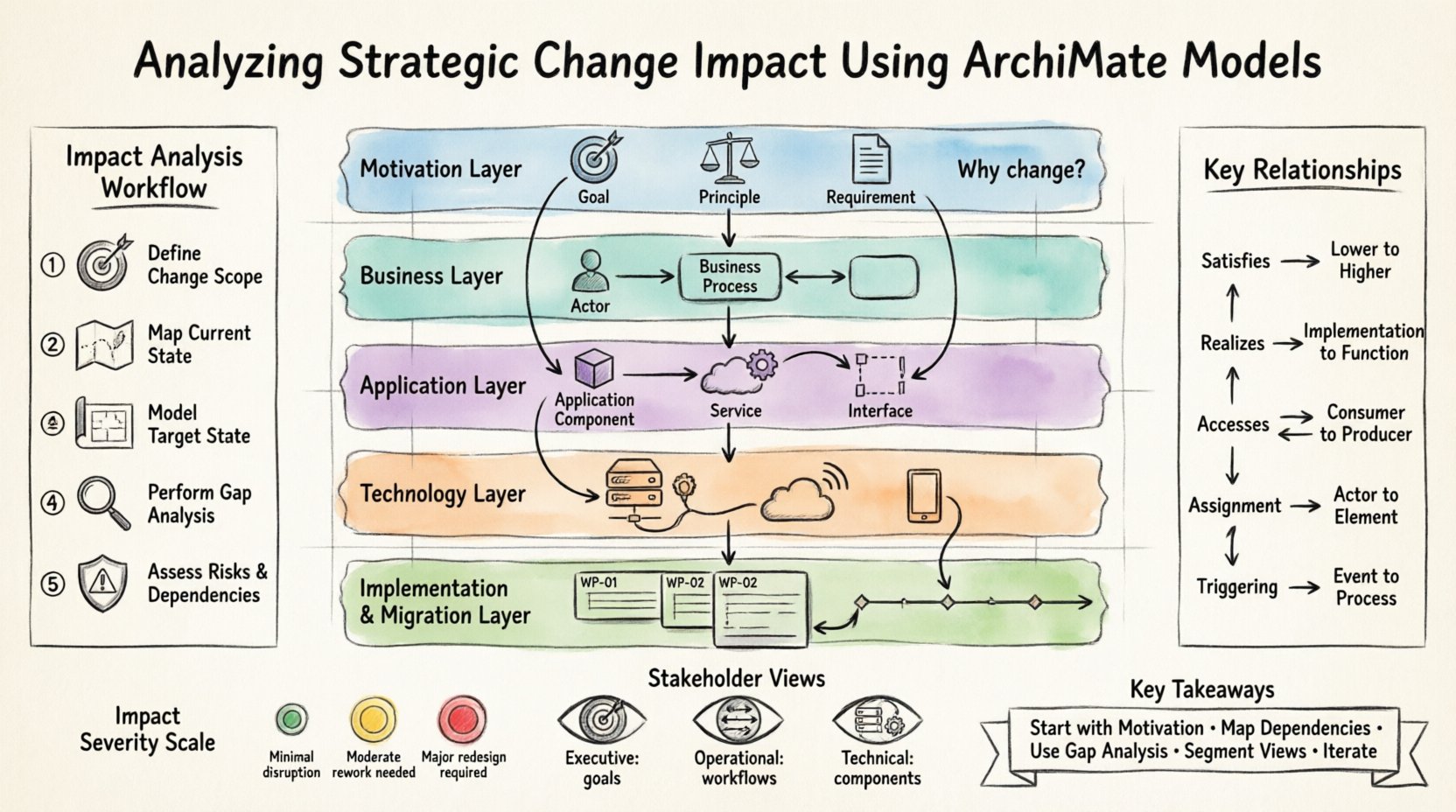
Effective impact analysis requires a layered view of the enterprise. ArchiMate organizes architecture into distinct layers. Each layer represents a specific aspect of the business and technology ecosystem. Understanding how changes propagate between these layers is central to the analysis.
1. Motivation Layer: The Strategic Driver
The Motivation Layer defines why a change is occurring. It includes elements such as Goals, Principles, Requirements, and Assessments. When analyzing strategic change, this layer is the starting point.
- Goal: Defines a desired state or outcome. Impact analysis begins by identifying which goals are being modified or retired.
- Principle: A rule that guides behavior. Changes here may require adjustments in process or technology to ensure compliance.
- Requirement: A need that must be met. This often triggers the change itself.
By modeling the motivation layer, architects can trace a requirement back to the specific business processes and applications that must adapt. This ensures that the change is not just technical but aligned with organizational intent.
2. Business Layer: The Operational Core
The Business Layer describes the visible activities of the organization. It includes Business Actors, Business Roles, Business Processes, Business Functions, Business Objects, and Business Services.
When a strategic goal changes, the Business Layer is typically the first to feel the impact. For example, if a company decides to move to a direct-to-consumer model, the Business Layer must reflect new processes for order fulfillment and customer interaction. Impact analysis here focuses on:
- Which processes will be added, removed, or modified?
- How will roles and responsibilities shift?
- What business objects (data entities) are affected?
3. Application Layer: The Digital Enabler
Application Services, Application Functions, Application Components, and Application Interfaces make up the Application Layer. This layer supports the Business Layer. Changes in strategy often necessitate changes in application functionality.
Impact analysis in this layer involves tracing dependencies. If a Business Process requires a specific Application Service, and that service is retired, the process cannot execute as designed. Architects must map:
- Application Services accessed by Business Processes.
- Application Components that realize Application Functions.
- Interfaces that connect applications to external systems.
4. Technology Layer: The Infrastructure
The Technology Layer consists of Technology Services, Technology Functions, Technology Components, and Devices. This is the physical or virtual infrastructure that hosts the applications.
Strategic changes often drive infrastructure modernization. Impact analysis here ensures that the underlying hardware or cloud environment can support new application requirements. Key considerations include:
- Performance requirements for new workloads.
- Security constraints for data handling.
- Network topology changes required for new connectivity.
5. Implementation & Migration Layer: The Change Vehicle
This layer manages the transition from the current state to the target state. It includes Work Packages, Projects, and Deliverables. It is crucial for understanding the sequence of changes.
- Which changes happen in which phase?
- Are there dependencies between work packages?
- What are the milestones for measuring success?
🔗 Tracing Dependencies and Relationships
The power of ArchiMate lies in the relationships between elements. These relationships define the flow of control, data, and support. During impact analysis, understanding the type of relationship is vital for assessing the severity of a change.
Key Relationship Types
The following table outlines common relationships and their implications for strategic change.
| Relationship Type | Direction | Impact Implication |
|---|---|---|
| Satisfies | Lower to Higher | Changing the lower element may fail to satisfy the higher goal or requirement. |
| Realizes | Lower to Higher | Modifying the implementation may break the realization of the business function. |
| Accesses | Consumer to Producer | If the accessed service changes, the consumer process may fail or degrade. |
| Assignment | Actor to Element | Changes in roles affect who is responsible for the process or object. |
| Triggering | Event to Process | Changes in triggering events alter the flow of business activities. |
Propagation Logic
When a change occurs, it propagates along these relationship lines. For instance, if a Business Process is modified, the Business Service it provides might change. This change then requires the Application Service to adapt. Finally, the Technology Component hosting that application may need reconfiguration.
Impact analysis involves tracing these paths backward from the change point to the root cause and forward to the affected consumers. This ensures no dependency is overlooked.
🛠️ The Impact Analysis Workflow
Conducting an impact analysis is a systematic process. It moves from defining the change to quantifying the effort required to implement it. The following workflow provides a structured approach.
Step 1: Define the Change Scope
Begin by clearly articulating the strategic change. Use the Motivation Layer to document the specific Goal or Requirement that is driving the initiative. Avoid vague descriptions. Instead of saying “improve efficiency,” specify “reduce order processing time by 20%”.
- Identify the specific strategic drivers.
- Document the current vs. target state goals.
- Establish the boundaries of the analysis.
Step 2: Map the Current State
Ensure the existing models are accurate and up-to-date. An analysis based on outdated architecture will yield incorrect results. Verify that the Business, Application, and Technology layers reflect the reality of the organization.
- Review process maps for accuracy.
- Check application inventory against actual usage.
- Validate technology infrastructure diagrams.
Step 3: Model the Target State
Create the architecture that represents the desired future. This does not mean rebuilding the entire model. Focus on the elements directly involved in the change. Use the same modeling conventions to ensure consistency.
- Define new Business Processes or modify existing ones.
- Introduce new Application Services or retire old ones.
- Specify Technology changes required for deployment.
Step 4: Perform Gap Analysis
Compare the current state model with the target state model. Identify the differences. These differences represent the work required to bridge the gap.
- List elements that need to be created.
- List elements that need to be modified.
- List elements that need to be decommissioned.
This gap list becomes the basis for the work package definition in the Implementation & Migration Layer.
Step 5: Assess Risks and Dependencies
Review the identified gaps against known risks. Are there legacy systems that cannot be easily modified? Is there a single point of failure in the new design? Use the relationship paths to identify dependencies that could become bottlenecks.
- Identify critical paths in the change sequence.
- Highlight dependencies on external vendors.
- Assess data migration risks.
📉 Quantifying Impact Severity
Not all changes carry the same weight. Some modifications are minor tweaks, while others require fundamental restructuring. To manage resources effectively, impact severity should be categorized.
Architects can assign severity levels based on the scope of the affected elements. A simple change to a user interface label has low severity. A change to a core Business Process that affects customer data has high severity.
- Low Impact: Internal processes, non-critical reporting, minor configuration changes.
- Medium Impact: Departmental processes, external interfaces, moderate data changes.
- High Impact: Core business functions, regulatory compliance, major data restructuring, customer-facing services.
This classification helps leadership prioritize initiatives and allocate budget. It also aids in risk management planning.
👥 Communicating Impact to Stakeholders
Technical models can be dense. Stakeholders from finance, operations, and executive leadership may not understand ArchiMate notation. Effective impact analysis requires translating the model into clear insights.
Using Views
ArchiMate supports the concept of Views. A View is a representation of the architecture from a specific perspective. For impact analysis, creating specific views for different stakeholder groups is essential.
- Executive View: Focus on Motivation and Business layers. Show goals, value streams, and high-level business processes.
- Operational View: Focus on Business Processes and Application Services. Show workflows and system interactions.
- Technical View: Focus on Application and Technology layers. Show components, servers, and network connections.
Visualizing Dependencies
Use visual cues in the diagrams to highlight impact. Color-coding can indicate the status of an element (e.g., red for affected, green for unaffected). Highlighting the path of a dependency helps stakeholders see the chain of events.
- Use distinct line styles for critical dependencies.
- Annotate diagrams with impact notes.
- Create summary dashboards showing affected counts.
⚠️ Common Pitfalls in Impact Analysis
Even with a robust framework, errors can occur. Being aware of common pitfalls helps maintain the integrity of the analysis.
1. Over-Modeling
Modeling every single element in the enterprise is unnecessary for every analysis. It creates noise and slows down the process. Focus only on the relevant scope. If a change affects the sales department, there is no need to model the manufacturing floor unless there is a direct link.
2. Ignoring the Motivation Layer
Many teams jump straight to the Business or Technology layers. Without the Motivation Layer, it is difficult to justify the change or measure success. Always link the technical changes back to the business goals.
3. Static Models
Models become outdated quickly. If the architecture is not maintained, the impact analysis will be based on false premises. Regular reviews and updates are necessary to keep the models relevant.
4. Linear Thinking
Enterprise architectures are not linear. They are complex networks of dependencies. Assuming a change only affects one downstream process is dangerous. Always trace the full path of the relationship.
🔄 Maintenance and Continuous Improvement
Impact analysis is not a one-time activity. Strategic change is continuous. The models must evolve alongside the organization.
- Version Control: Maintain versions of the models to track history. This allows for comparison over time.
- Change Logs: Document every change made to the model. This provides an audit trail for the analysis.
- Feedback Loops: Incorporate lessons learned from past changes into future analyses. Did the model predict the risk accurately?
📝 Practical Considerations for Implementation
Implementing an impact analysis process requires organizational readiness. It is not just a technical task; it is a cultural one.
Training and Competency
Team members need to understand the ArchiMate language. They must know how to model relationships correctly. Training ensures consistency across the architecture team.
- Conduct workshops on ArchiMate syntax.
- Establish modeling standards and guidelines.
- Assign roles for model ownership.
Tool Support
While the framework is independent of tools, using software to manage models improves efficiency. Tools allow for automated dependency checking and impact tracing. They also facilitate collaboration among multiple architects.
Data Quality
The accuracy of the analysis depends on the accuracy of the data in the models. Garbage in, garbage out. Ensure that the data repository is clean and verified.
- Validate data against source systems.
- Remove duplicate entries.
- Ensure all relationships are explicitly defined.
🚀 Moving Forward with Confidence
Strategic change is inevitable. The organizations that succeed are those that can navigate this change with clarity and precision. ArchiMate models offer the structure needed to understand the complexity of the enterprise.
By systematically analyzing the Motivation, Business, Application, and Technology layers, architects can predict impact with greater accuracy. This reduces risk, optimizes resource allocation, and ensures that strategic goals are actually achieved. The process requires discipline and attention to detail, but the return on investment is significant.
Start by mapping the motivation behind your next initiative. Trace the dependencies. Identify the gaps. Communicate the findings. This approach transforms architecture from a documentation exercise into a strategic asset.
📊 Summary of Key Takeaways
- Start with Motivation: Always link technical changes to business goals and requirements.
- Map Dependencies: Understand how elements connect across layers to assess ripple effects.
- Use Gap Analysis: Compare current and target states to define the work required.
- Segment Views: Present information tailored to different stakeholder groups.
- Iterate: Keep models updated to reflect the changing reality of the organization.
Adopting this structured approach ensures that strategic change is managed effectively. It provides a clear path from vision to execution, minimizing disruption and maximizing value.