
Introduction
In the rapidly evolving landscape of software development, clear communication of system architecture has become a critical success factor. The C4 model, created by Simon Brown, provides a hierarchical approach to visualizing software architecture that bridges the gap between high-level business stakeholders and technical implementation teams. Among the four levels of the C4 model—Context, Containers, Components, and Code—the Container diagram serves as the crucial middle layer that reveals how an application is structured into deployable units.
This case study explores the practical application of C4 Container diagrams using modern tooling, specifically Visual Paradigm’s C4 Model capabilities combined with VPasCode (Visual Paradigm as Code) and AI-assisted features. We’ll examine why container-level visualization matters, who benefits from it, and provide concrete examples using PlantUML syntax that can be leveraged across various diagramming tools.
The container diagram answers fundamental questions: What are the major technology choices? How do different services communicate? Where are the boundaries between frontend, backend, databases, and external systems? By focusing on this level, architects and product managers can make informed decisions about technology stacks, deployment strategies, and integration patterns without getting lost in implementation details or remaining too abstract to be actionable.
Key Concepts: Understanding the C4 Container Level
What is a Container in C4?
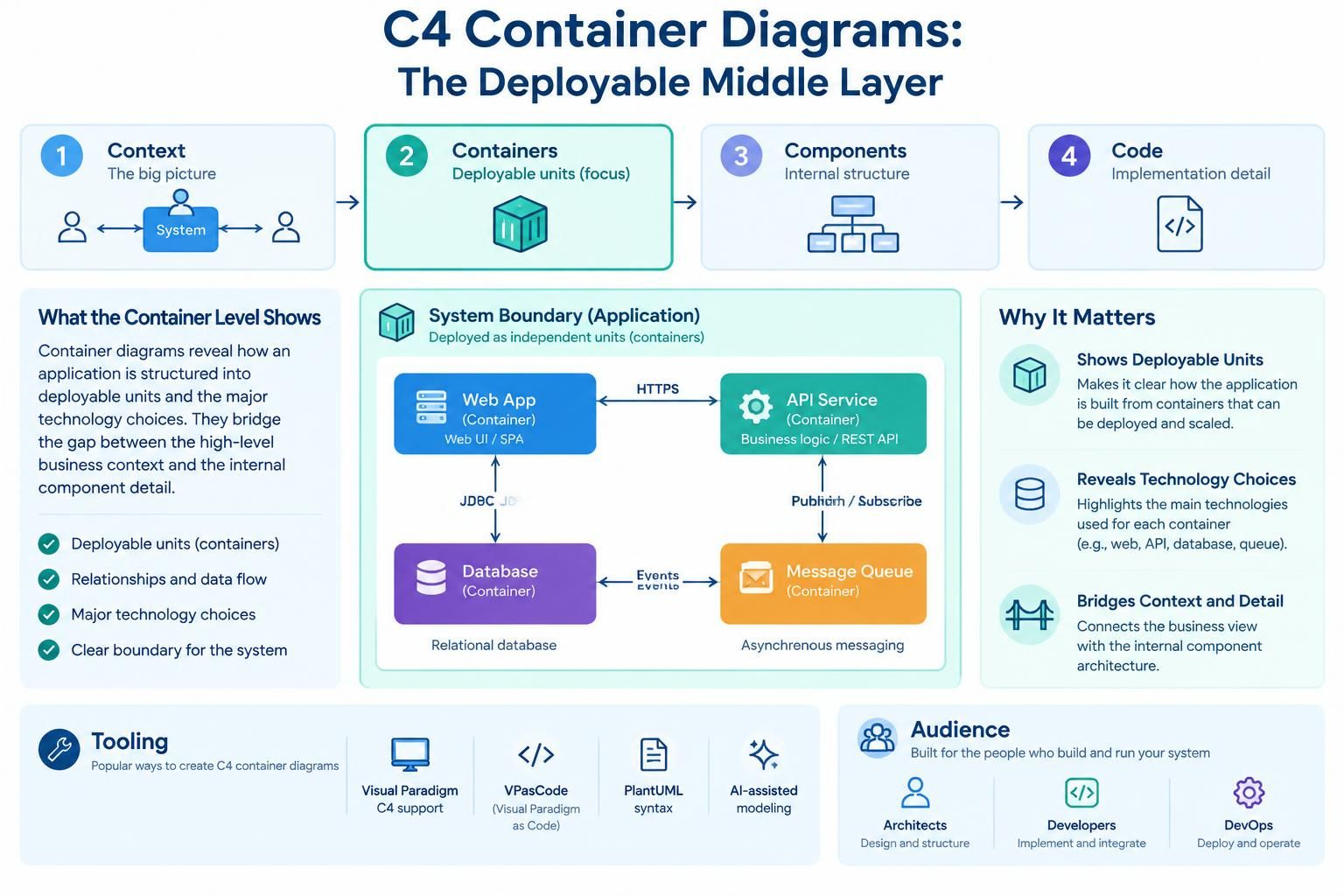
A container represents an independently deployable unit that hosts code or data. Examples include:
-
Web applications (React, Angular apps)
-
Mobile applications (iOS, Android apps)
-
Server-side applications (Spring Boot, Node.js services)
-
Databases (PostgreSQL, MongoDB instances)
-
Message queues (Kafka, RabbitMQ)
-
File systems or blob storage
Important distinction: A container is NOT a Docker container necessarily—it’s a runtime environment. One physical server might host multiple containers, or one container might be distributed across multiple servers.
Position in the C4 Hierarchy
-
Level 1 – System Context: Shows the system as a single box with users and external systems
-
Level 2 – Container: Breaks the system into containers showing technology choices and interactions ← Our Focus
-
Level 3 – Component: Zooms into a single container to show its internal components
-
Level 4 – Code: Optional class-level detail (rarely used in practice)
Core Elements in Container Diagrams
-
People/Users: Actors interacting with the system
-
Software Systems: External systems your application depends on
-
Containers: Your application’s deployable units with technology labels
-
Relationships: Communication paths with protocols and descriptions
Why Container Diagrams Matter: Benefits and Stakeholders
Who Benefits?
1. Product Managers (like Eddie)
-
Understand technical feasibility of feature requests
-
Identify dependencies that impact roadmap planning
-
Communicate architectural constraints to stakeholders
-
Make informed decisions about build vs. buy scenarios
2. Software Architects & Tech Leads
-
Document technology decisions explicitly
-
Identify single points of failure
-
Plan migration strategies (e.g., monolith to microservices)
-
Onboard new team members efficiently
3. Development Teams
-
Clarify service boundaries and ownership
-
Understand integration contracts
-
Debug cross-service issues faster
-
Plan refactoring efforts
4. DevOps & SRE Engineers
-
Map deployment topologies
-
Identify monitoring and logging requirements
-
Plan infrastructure provisioning
-
Design disaster recovery strategies
5. Security & Compliance Teams
-
Identify data flow boundaries
-
Assess attack surfaces
-
Plan security controls per container
-
Document compliance-relevant architectures
Standout Advantages
✅ Technology Transparency: Every container explicitly states its technology stack
✅ Deployment Clarity: Shows what needs to be deployed independently
✅ Communication Protocol Visibility: Reveals REST, gRPC, messaging, etc.
✅ Right Level of Abstraction: Technical enough for engineers, understandable for PMs
✅ Living Documentation: When maintained as code, stays current with the system
Usage Cases: When to Use Container Diagrams
Case 1: Greenfield Project Planning
Scenario: A startup building a new e-commerce platform
Use: Define initial container structure before writing code
Benefit: Align engineering and product on technology choices early
Case 2: Monolith Decomposition
Scenario: Legacy monolithic application causing deployment bottlenecks
Use: Map existing containers and plan extraction boundaries
Benefit: Create incremental migration roadmap with clear milestones
Case 3: Mergers & Acquisitions Integration
Scenario: Two companies merging their customer platforms
Use: Compare container architectures to identify integration points
Benefit: Reduce integration risk by understanding technology mismatches
Case 4: Cloud Migration
Scenario: Moving on-premise systems to AWS/Azure/GCP
Use: Document current containers and target cloud-native equivalents
Benefit: Plan migration sequence and identify refactoring needs
Case 5: Security Audit Preparation
Scenario: Preparing for SOC 2 or ISO 27001 certification
Use: Document all data flows and container boundaries
Benefit: Provide auditors with clear architecture documentation
Case 6: Incident Post-Mortem Analysis
Scenario: Major outage caused by cascading service failures
Use: Review container dependencies to identify weak links
Benefit: Implement circuit breakers and improve resilience
Practical Examples: C4-PlantUML Code
Below are comprehensive examples using C4-PlantUML syntax. These can be rendered in Visual Paradigm, PlantUML servers, or any C4-compatible tool.
Example 1: Simple E-Commerce Platform
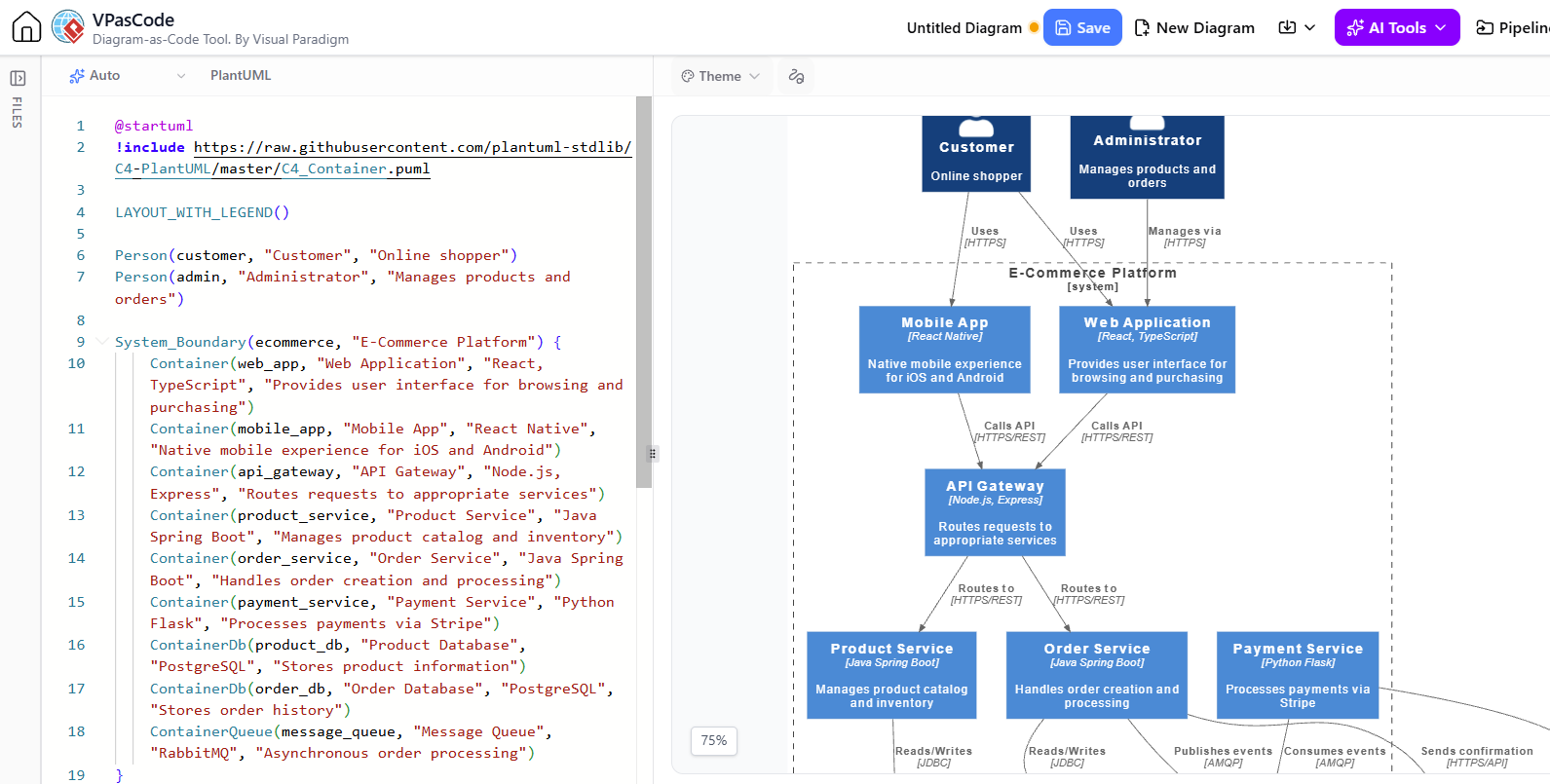
@startuml
!include https://raw.githubusercontent.com/plantuml-stdlib/C4-PlantUML/master/C4_Container.puml

LAYOUT_WITH_LEGEND()

Person(customer, "Customer", "Online shopper")
Person(admin, "Administrator", "Manages products and orders")

System_Boundary(ecommerce, "E-Commerce Platform") {
    Container(web_app, "Web Application", "React, TypeScript", "Provides user interface for browsing and purchasing")
    Container(mobile_app, "Mobile App", "React Native", "Native mobile experience for iOS and Android")
    Container(api_gateway, "API Gateway", "Node.js, Express", "Routes requests to appropriate services")
    Container(product_service, "Product Service", "Java Spring Boot", "Manages product catalog and inventory")
    Container(order_service, "Order Service", "Java Spring Boot", "Handles order creation and processing")
    Container(payment_service, "Payment Service", "Python Flask", "Processes payments via Stripe")
    ContainerDb(product_db, "Product Database", "PostgreSQL", "Stores product information")
    ContainerDb(order_db, "Order Database", "PostgreSQL", "Stores order history")
    ContainerQueue(message_queue, "Message Queue", "RabbitMQ", "Asynchronous order processing")
}

System_Ext(stripe, "Stripe", "Payment processing")
System_Ext(email_service, "SendGrid", "Email delivery")

Rel(customer, web_app, "Uses", "HTTPS")
Rel(customer, mobile_app, "Uses", "HTTPS")
Rel(admin, web_app, "Manages via", "HTTPS")

Rel(web_app, api_gateway, "Calls API", "HTTPS/REST")
Rel(mobile_app, api_gateway, "Calls API", "HTTPS/REST")

Rel(api_gateway, product_service, "Routes to", "HTTPS/REST")
Rel(api_gateway, order_service, "Routes to", "HTTPS/REST")

Rel(product_service, product_db, "Reads/Writes", "JDBC")
Rel(order_service, order_db, "Reads/Writes", "JDBC")

Rel(order_service, message_queue, "Publishes events", "AMQP")
Rel(payment_service, message_queue, "Consumes events", "AMQP")

Rel(payment_service, stripe, "Processes payment", "HTTPS/API")
Rel(order_service, email_service, "Sends confirmation", "HTTPS/API")

@enduml
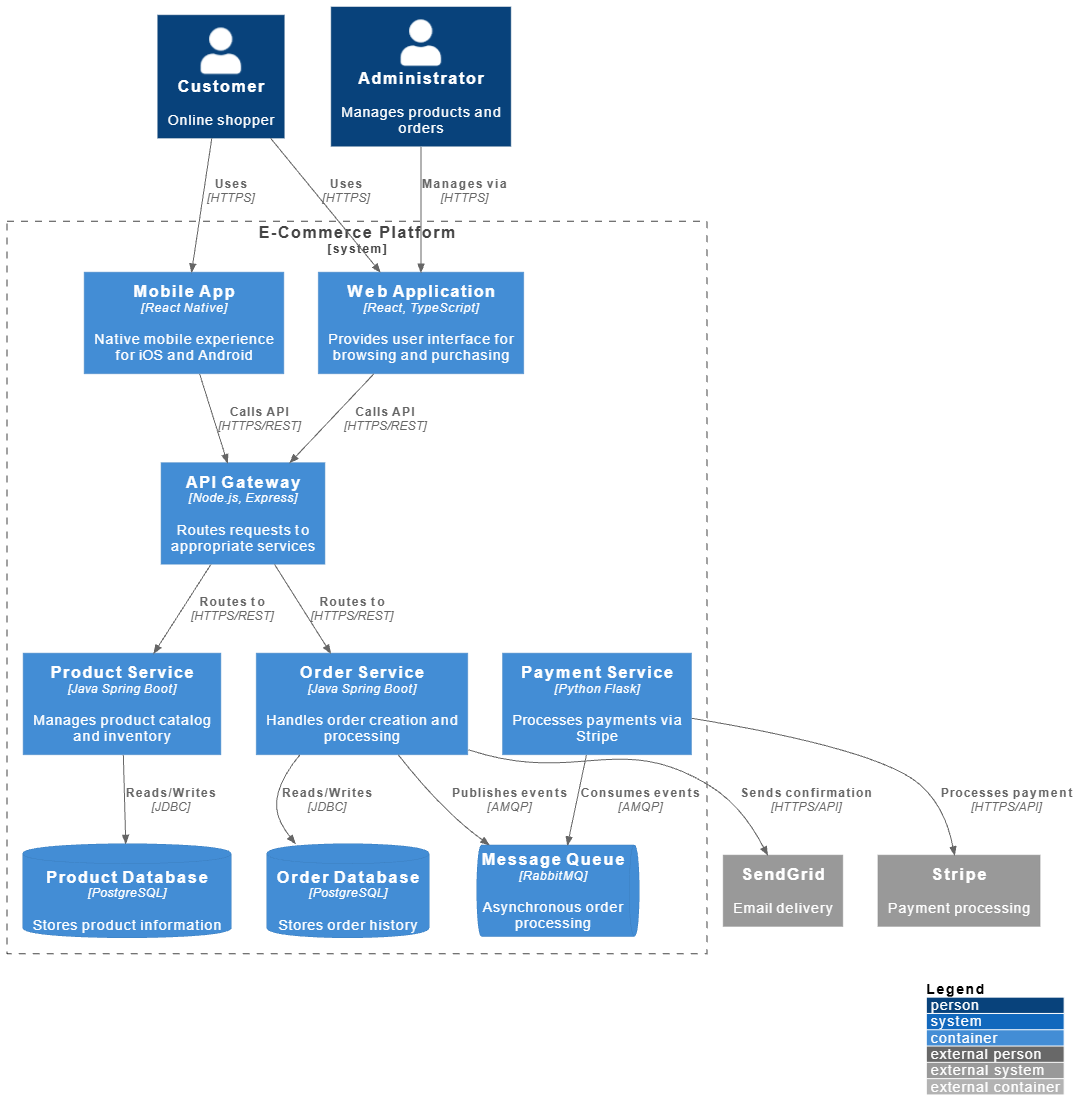
Example 2: Microservices Architecture with Event-Driven Patterns
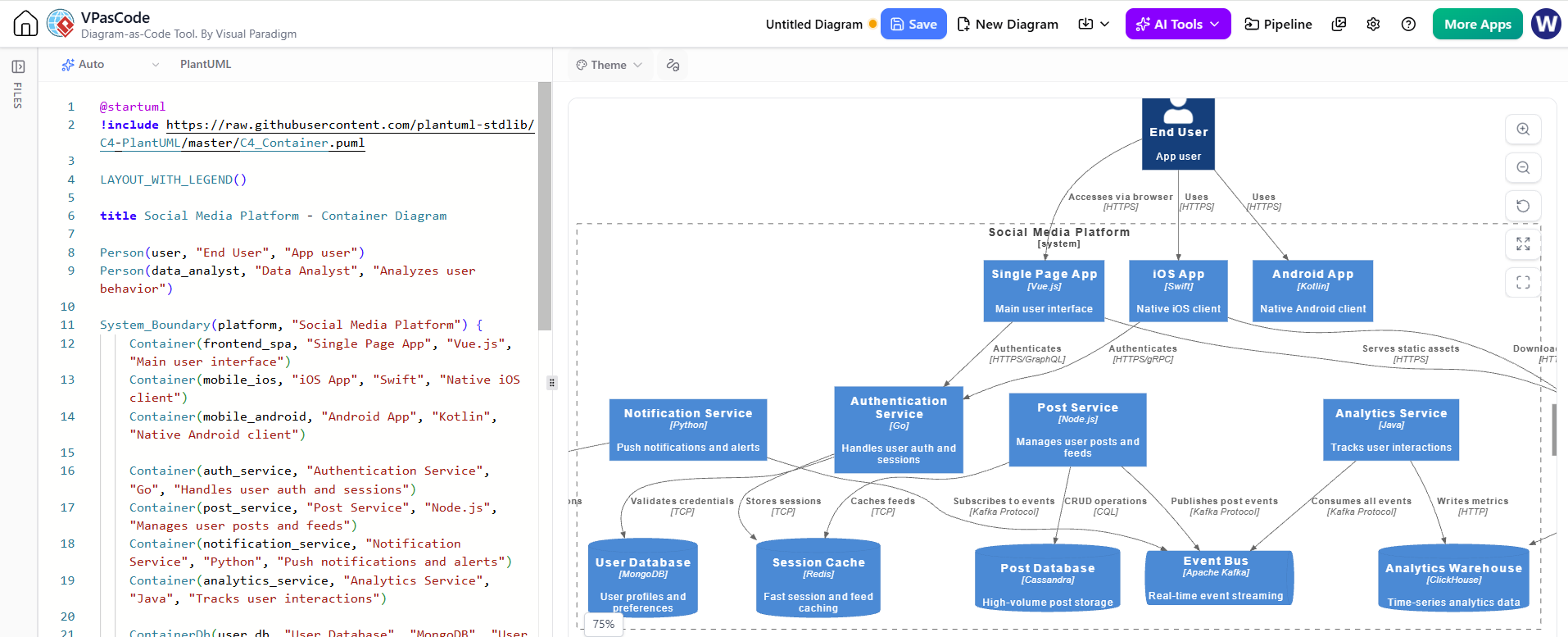
@startuml
!include https://raw.githubusercontent.com/plantuml-stdlib/C4-PlantUML/master/C4_Container.puml

LAYOUT_WITH_LEGEND()

title Social Media Platform - Container Diagram

Person(user, "End User", "App user")
Person(data_analyst, "Data Analyst", "Analyzes user behavior")

System_Boundary(platform, "Social Media Platform") {
    Container(frontend_spa, "Single Page App", "Vue.js", "Main user interface")
    Container(mobile_ios, "iOS App", "Swift", "Native iOS client")
    Container(mobile_android, "Android App", "Kotlin", "Native Android client")

    Container(auth_service, "Authentication Service", "Go", "Handles user auth and sessions")
    Container(post_service, "Post Service", "Node.js", "Manages user posts and feeds")
    Container(notification_service, "Notification Service", "Python", "Push notifications and alerts")
    Container(analytics_service, "Analytics Service", "Java", "Tracks user interactions")

    ContainerDb(user_db, "User Database", "MongoDB", "User profiles and preferences")
    ContainerDb(post_db, "Post Database", "Cassandra", "High-volume post storage")
    ContainerDb(analytics_db, "Analytics Warehouse", "ClickHouse", "Time-series analytics data")

    ContainerQueue(event_bus, "Event Bus", "Apache Kafka", "Real-time event streaming")
    ContainerDb(redis_cache, "Session Cache", "Redis", "Fast session and feed caching")
}

System_Ext(push_provider, "Firebase Cloud Messaging", "Push notifications")
System_Ext(cdn, "CloudFront CDN", "Content delivery")

Rel(user, frontend_spa, "Accesses via browser", "HTTPS")
Rel(user, mobile_ios, "Uses", "HTTPS")
Rel(user, mobile_android, "Uses", "HTTPS")

Rel(frontend_spa, cdn, "Serves static assets", "HTTPS")
Rel(mobile_ios, cdn, "Downloads media", "HTTPS")

Rel(frontend_spa, auth_service, "Authenticates", "HTTPS/GraphQL")
Rel(mobile_ios, auth_service, "Authenticates", "HTTPS/gRPC")

Rel(auth_service, user_db, "Validates credentials", "TCP")
Rel(auth_service, redis_cache, "Stores sessions", "TCP")

Rel(post_service, post_db, "CRUD operations", "CQL")
Rel(post_service, redis_cache, "Caches feeds", "TCP")

Rel(post_service, event_bus, "Publishes post events", "Kafka Protocol")
Rel(notification_service, event_bus, "Subscribes to events", "Kafka Protocol")
Rel(analytics_service, event_bus, "Consumes all events", "Kafka Protocol")

Rel(notification_service, push_provider, "Sends push notifications", "HTTPS/API")
Rel(analytics_service, analytics_db, "Writes metrics", "HTTP")

Rel(data_analyst, analytics_db, "Queries for insights", "SQL")

@enduml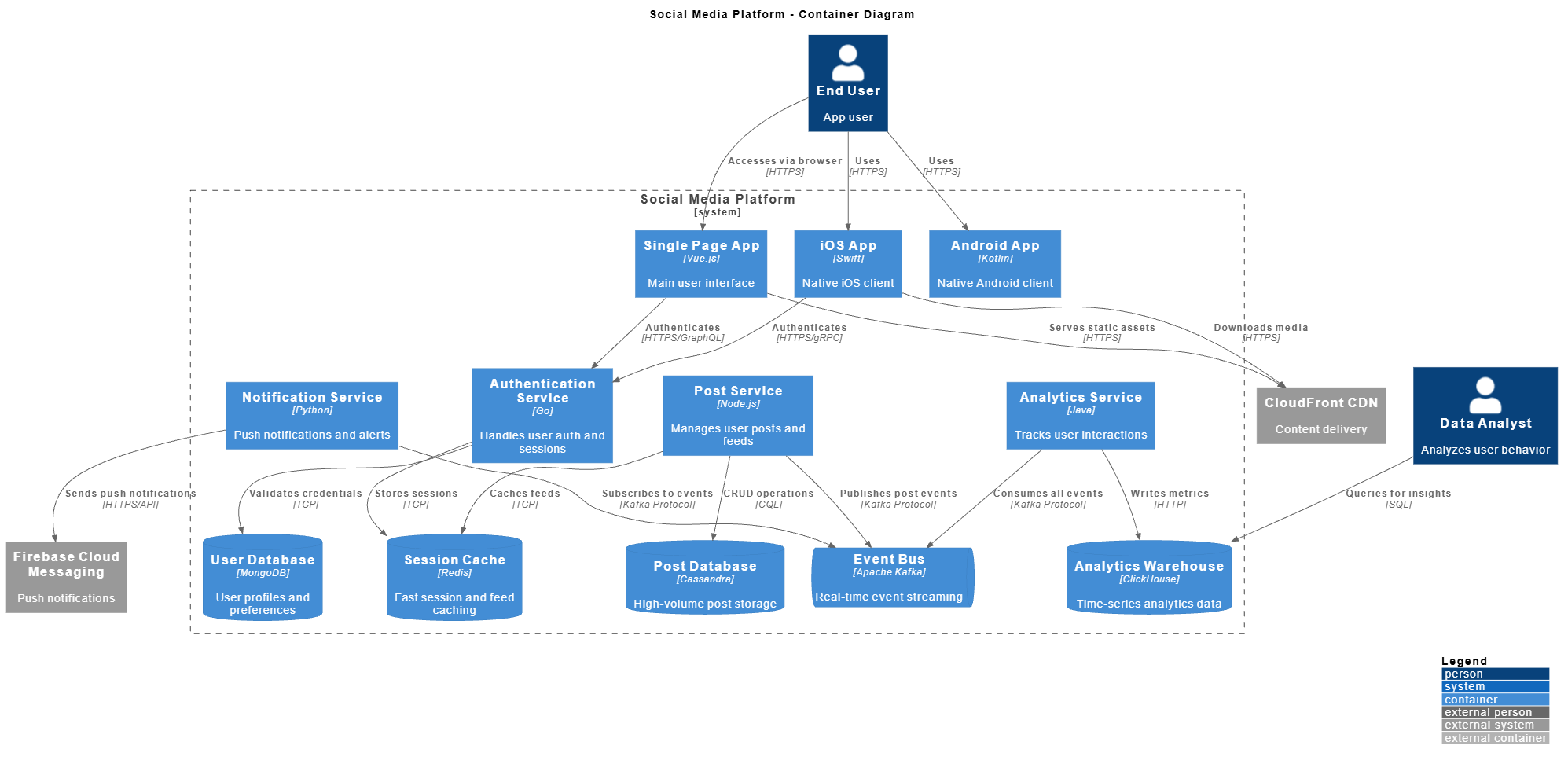
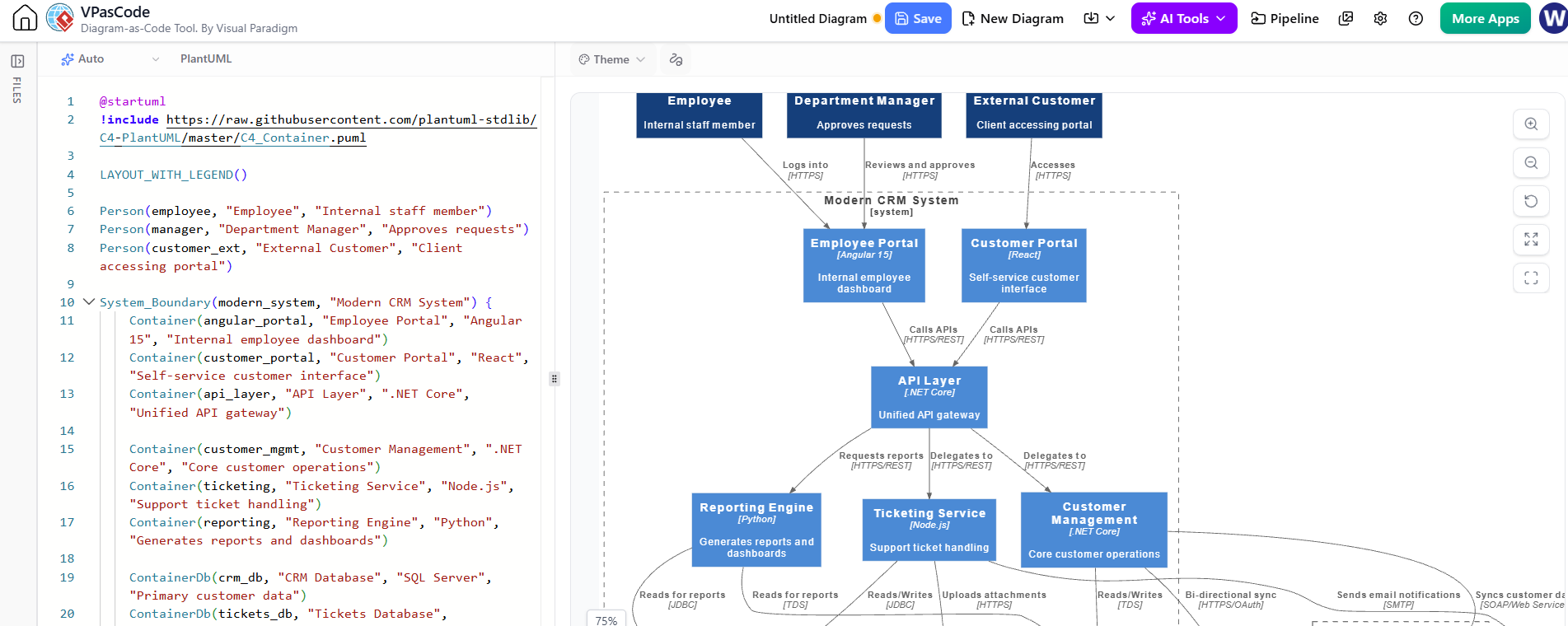
Example 3: Enterprise System with Legacy Integration
@startuml
!include https://raw.githubusercontent.com/plantuml-stdlib/C4-PlantUML/master/C4_Container.puml

LAYOUT_WITH_LEGEND()

Person(employee, "Employee", "Internal staff member")
Person(manager, "Department Manager", "Approves requests")
Person(customer_ext, "External Customer", "Client accessing portal")

System_Boundary(modern_system, "Modern CRM System") {
    Container(angular_portal, "Employee Portal", "Angular 15", "Internal employee dashboard")
    Container(customer_portal, "Customer Portal", "React", "Self-service customer interface")
    Container(api_layer, "API Layer", ".NET Core", "Unified API gateway")

    Container(customer_mgmt, "Customer Management", ".NET Core", "Core customer operations")
    Container(ticketing, "Ticketing Service", "Node.js", "Support ticket handling")
    Container(reporting, "Reporting Engine", "Python", "Generates reports and dashboards")

    ContainerDb(crm_db, "CRM Database", "SQL Server", "Primary customer data")
    ContainerDb(tickets_db, "Tickets Database", "PostgreSQL", "Support tickets")
    Container(document_store, "Document Store", "Azure Blob Storage", "Stores attachments")
}

System_Boundary(legacy_system, "Legacy ERP System") {
    Container(erp_mainframe, "ERP Mainframe", "COBOL", "Legacy enterprise resource planning")
    ContainerDb(erp_db, "ERP Database", "Oracle", "Financial and inventory data")
}

System_Ext(salesforce, "Salesforce", "External CRM sync")
System_Ext(smtp_server, "SMTP Server", "Email delivery")

Rel(employee, angular_portal, "Logs into", "HTTPS")
Rel(manager, angular_portal, "Reviews and approves", "HTTPS")
Rel(customer_ext, customer_portal, "Accesses", "HTTPS")

Rel(angular_portal, api_layer, "Calls APIs", "HTTPS/REST")
Rel(customer_portal, api_layer, "Calls APIs", "HTTPS/REST")

Rel(api_layer, customer_mgmt, "Delegates to", "HTTPS/REST")
Rel(api_layer, ticketing, "Delegates to", "HTTPS/REST")
Rel(api_layer, reporting, "Requests reports", "HTTPS/REST")

Rel(customer_mgmt, crm_db, "Reads/Writes", "TDS")
Rel(ticketing, tickets_db, "Reads/Writes", "JDBC")
Rel(ticketing, document_store, "Uploads attachments", "HTTPS")

Rel(customer_mgmt, erp_mainframe, "Syncs customer data", "SOAP/Web Services")
Rel(erp_mainframe, erp_db, "Accesses", "OCI")

Rel(reporting, crm_db, "Reads for reports", "TDS")
Rel(reporting, tickets_db, "Reads for reports", "JDBC")

Rel(ticketing, smtp_server, "Sends email notifications", "SMTP")
Rel(customer_mgmt, salesforce, "Bi-directional sync", "HTTPS/OAuth")

@enduml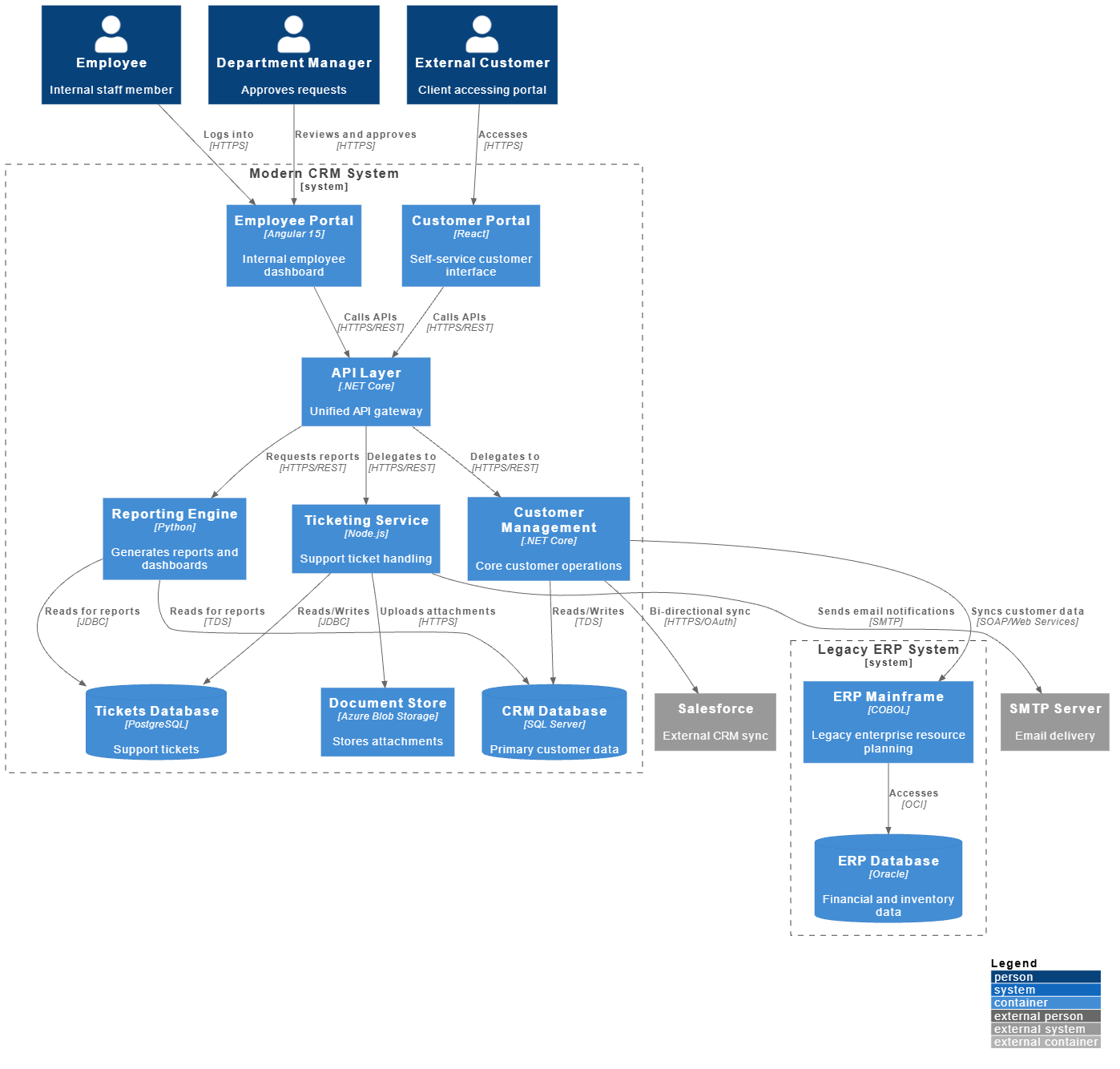
Tooling Deep Dive: Visual Paradigm + VPasCode + AI Assistance
Visual Paradigm C4 Model Tool
Visual Paradigm offers native C4 model support with several advantages:
Key Features:
-
Drag-and-drop C4 elements with proper stereotypes
-
Automatic layout optimized for readability
-
Multi-diagram navigation linking Context → Container → Component
-
Export options: PNG, SVG, PDF, HTML
-
Team collaboration with version control integration
-
Enterprise-grade security and access controls
Four Levels Support:
-
Context Diagram: High-level stakeholder view
-
Container Diagram: Technology and deployment view ← Primary focus
-
Component Diagram: Internal service architecture
-
Code Diagram: Class-level details (optional)
VPasCode: Diagram as Code Approach
VPasCode brings the benefits of “diagrams as code” to Visual Paradigm:
Benefits of Diagram as Code:
✅ Version Control: Track changes in Git alongside source code
✅ Code Review: Review architecture changes in pull requests
✅ Automation: Generate diagrams from CI/CD pipelines
✅ Consistency: Enforce naming conventions and standards
✅ Reusability: Create templates and shared libraries
VPasCode Workflow:
# Example VPasCode configuration
diagram:
  type: c4-container
  name: "E-Commerce Platform"
  elements:
    - type: person
      name: "Customer"
      description: "Online shopper"
    - type: container
      name: "Web Application"
      technology: "React, TypeScript"
      description: "User interface"
  relationships:
    - from: "Customer"
      to: "Web Application"
      type: "Uses"
      technology: "HTTPS"
AI-Assisted Features
Modern tools including Visual Paradigm now integrate AI capabilities:
AI-Powered Capabilities:
-
Natural Language to Diagram
-
Describe your architecture in plain English
-
AI generates initial C4 diagram structure
-
Example prompt: “Create a container diagram for a ride-sharing app with driver app, rider app, dispatch service, and payment processor”
-
-
Diagram Validation
-
AI checks for common anti-patterns
-
Identifies missing relationships
-
Suggests improvements for clarity
-
-
Code Generation from Diagrams
-
Generate skeleton microservice code
-
Create API contracts from container relationships
-
Produce Terraform/IaC templates
-
-
Documentation Generation
-
Auto-generate architecture decision records (ADRs)
-
Create onboarding documentation
-
Produce compliance-ready artifacts
-
-
Intelligent Suggestions
-
Recommend technology choices based on requirements
-
Identify potential bottlenecks
-
Suggest security improvements
-
Example AI Interaction:
User: "Add a caching layer to reduce database load"

AI Assistant:
"Suggested addition:
- Container: 'Redis Cache' (Redis)
- Placement: Between API Gateway and Product Service
- Benefit: Reduces read latency by ~80%
- Consideration: Cache invalidation strategy needed

Would you like me to update the diagram?"
Tips and Tricks for Effective Container Diagrams
Best Practices
1. Keep It Current
-
Treat diagrams as living documentation
-
Update when technology choices change
-
Integrate diagram updates into definition of done
2. Be Consistent with Naming
-
Use clear, descriptive names
-
Include technology in labels:
"Product Service (Java Spring Boot)" -
Maintain consistent terminology across diagrams
3. Show Direction and Protocols
-
Always indicate communication direction
-
Specify protocols: HTTPS, gRPC, AMQP, JDBC
-
Note synchronous vs. asynchronous patterns
4. Limit Complexity
-
Maximum 10-15 containers per diagram
-
Split complex systems into multiple diagrams
-
Use grouping/boundaries for logical organization
5. Include Essential Details Only
-
Technology stack for each container
-
Deployment model if relevant (cloud, on-prem, hybrid)
-
Critical integrations and dependencies
-
Avoid implementation details (save for Component level)
6. Use Color Strategically
-
Different colors for different technology types
-
Highlight critical paths or recent changes
-
Maintain accessibility (colorblind-friendly palettes)
7. Link Related Diagrams
-
Reference Context diagram for broader scope
-
Link to Component diagrams for deeper dives
-
Create navigation aids for large systems
Common Pitfalls to Avoid
❌ Mixing Levels: Don’t include component details in container diagrams
❌ Over-detailing: Avoid showing classes, methods, or algorithms
❌ Ignoring External Systems: Always show third-party dependencies
❌ Static Documentation: Don’t let diagrams become outdated
❌ Too Many Relationships: Simplify to show only meaningful interactions
❌ Missing Technology Labels: Every container should state its tech stack
Pro Tips for Product Managers
💡 Use for Roadmap Planning: Identify which containers need work for upcoming features
💡 Stakeholder Communication: Show non-technical stakeholders the “big picture”
💡 Vendor Evaluation: Compare proposed architectures during procurement
💡 Risk Assessment: Identify single points of failure and dependencies
💡 Onboarding: Help new team members understand the system quickly
Pro Tips for Engineers
💡 Debugging Aid: Trace request flows across containers during incidents
💡 Refactoring Guide: Plan service extraction or consolidation
💡 API Contract Definition: Clarify integration boundaries
💡 Capacity Planning: Identify which containers need scaling
💡 Security Review: Map attack surfaces and data flows
Real-World Case Study: Migrating a Monolith to Microservices
Background
Company: Mid-sized fintech startup (similar profile to Eddie’s experience)
Challenge: Monolithic Java application becoming unmanageable with 50+ developers
Goal: Decompose into manageable microservices while maintaining uptime
Phase 1: Current State Container Diagram
Created a container diagram documenting the existing monolith:
-
Single WAR file deployed to Tomcat
-
Oracle database
-
External payment gateway
-
Email service integration
Phase 2: Target State Design
Designed target container architecture:
-
Separate authentication service
-
Account management service
-
Transaction processing service
-
Notification service
-
Shared API gateway
-
Individual databases per service (where appropriate)
Phase 3: Migration Roadmap
Used container diagrams to:
-
Identify extraction candidates: Low-coupling, high-cohesion modules
-
Plan strangler pattern: Route new features to new containers
-
Define integration contracts: API specifications between old and new
-
Track progress: Update diagrams as services were extracted
Results
✅ Reduced deployment time from 2 hours to 15 minutes
✅ Enabled independent team ownership of services
✅ Improved system resilience (failure isolation)
✅ Better technology flexibility (different stacks per service)
✅ Clearer onboarding for new developers
Lessons Learned
-
Container diagrams were essential for alignment across teams
-
Regular diagram reviews prevented architectural drift
-
AI-assisted suggestions helped identify overlooked dependencies
-
VPasCode enabled keeping diagrams in sync with actual deployments
Conclusion
The C4 Container diagram occupies a sweet spot in software architecture documentation—detailed enough to guide technical decisions yet abstract enough to remain comprehensible to diverse stakeholders. By focusing on independently deployable units and their interactions, container diagrams provide invaluable insights into system structure, technology choices, and integration patterns.
When combined with modern tooling like Visual Paradigm’s C4 Model support, VPasCode’s diagram-as-code capabilities, and AI-assisted features, creating and maintaining these diagrams becomes not just feasible but genuinely valuable. The ability to generate diagrams from code, validate architectures automatically, and keep documentation synchronized with implementation transforms architecture diagrams from stale artifacts into living, breathing guides for development teams.
For product managers like Eddie, container diagrams serve as a bridge between business requirements and technical implementation. They enable informed roadmap planning, realistic timeline estimates, and effective stakeholder communication. For engineering teams, they clarify service boundaries, simplify debugging, and guide refactoring efforts. For organizations undergoing digital transformation, they provide the visibility needed to make confident architectural decisions.
The key to success lies in treating container diagrams as living documentation—integrating them into development workflows, reviewing them regularly, and updating them as the system evolves. With the right tools and practices, C4 Container diagrams become not just documentation, but a strategic asset that accelerates development, reduces risk, and improves communication across the entire organization.
As software systems continue to grow in complexity, the ability to visualize and communicate architecture clearly becomes increasingly valuable. The C4 model’s container level, supported by modern diagramming tools and AI assistance, provides a practical, scalable approach to meeting this challenge. Whether you’re starting a greenfield project, decomposing a monolith, or integrating acquired systems, investing time in creating clear container diagrams will pay dividends throughout the software development lifecycle.
Final Recommendation: Start small—with your most critical system or current project. Create one container diagram, share it with your team, gather feedback, and iterate. You’ll quickly discover the value of having a shared visual understanding of your system’s architecture, and from there, expand the practice across your organization.
This case study demonstrates the practical application of C4 Container diagrams using industry-standard tooling. The examples provided can be adapted to your specific context, and the principles outlined apply regardless of your technology stack or organizational size.

