Introduction
Software architecture has evolved from monolithic documentation to dynamic, living models that communicate effectively across technical and non-technical stakeholders. The C4 model, created by Simon Brown, addresses a critical gap in traditional architecture documentation: the lack of clear, hierarchical abstractions that make complex systems understandable at different levels of detail.
The C4 model stands for Context, Containers, Components, and Code—four levels of architectural zoom that provide progressive disclosure of system complexity. At its foundation lies the C4 Context Diagram, which serves as the entry point for understanding any software system. This diagram answers fundamental questions: Who uses the system? What external systems does it interact with? And what value does it deliver?
This case study explores the practical application of C4 Context Diagrams through real-world scenarios, demonstrating how modern tooling—particularly Visual Paradigm’s C4 Model capabilities combined with VPasCode (diagram-as-code) and AI-assisted features—transforms architecture communication from static documentation into collaborative, maintainable artifacts. We’ll examine why this approach benefits product managers, developers, architects, and business stakeholders alike, while providing actionable tips for creating effective context diagrams that stand out in enterprise environments.
Key Concepts: Understanding the C4 Context Diagram
What is a C4 Context Diagram?
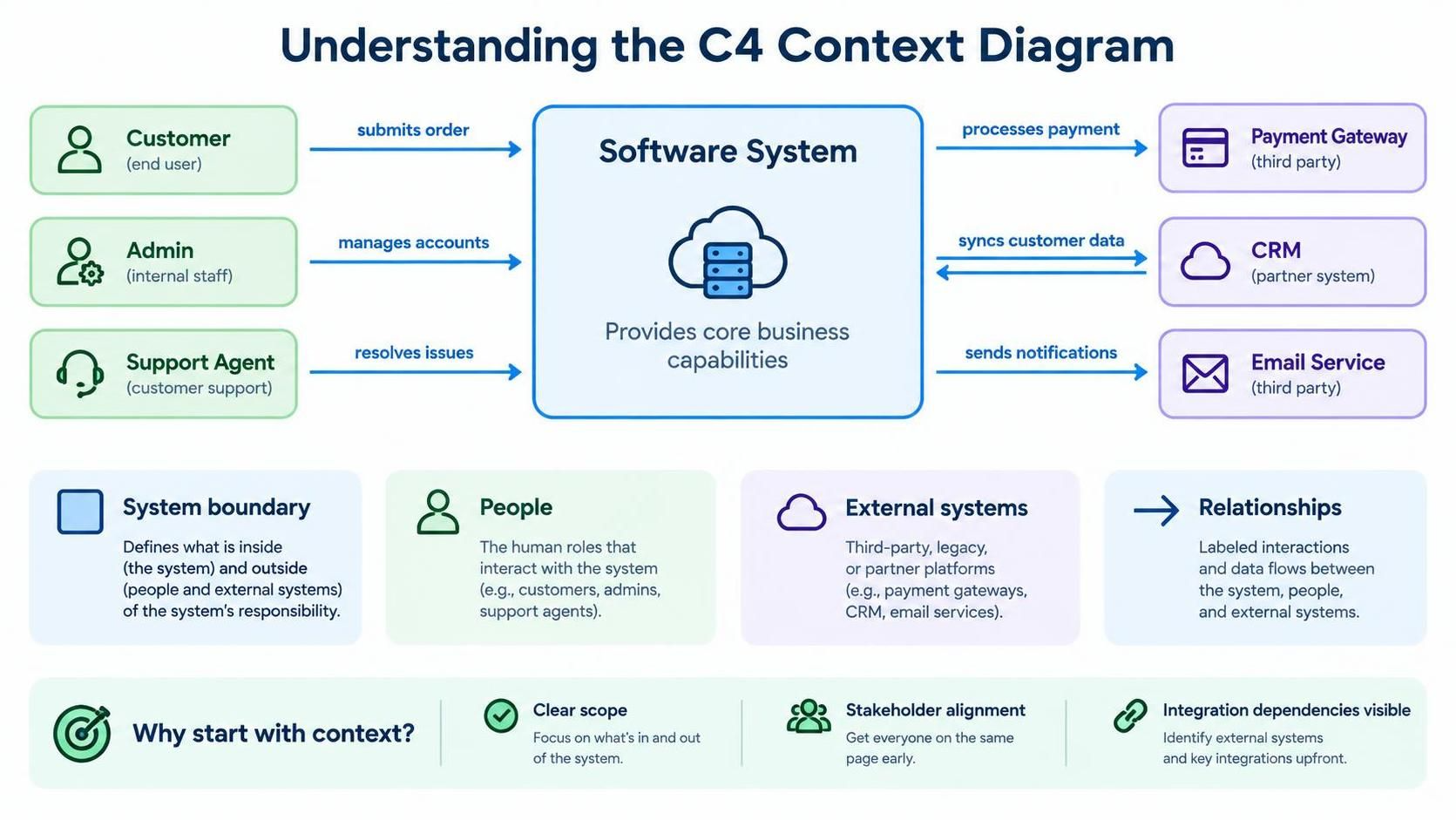
A C4 Context Diagram is the highest-level abstraction in the C4 model hierarchy. It depicts:
-
The software system being described (as a single box)
-
People (users, actors, roles) who interact with the system
-
External software systems that the system depends on or integrates with
-
Relationships between these elements, showing data flow and interactions
Core Elements
-
System Boundary: Clearly defines what is “inside” versus “outside” your responsibility
-
Actors/Users: Human roles interacting with the system (e.g., Customer, Admin, Support Agent)
-
External Systems: Third-party services, legacy systems, or partner platforms (e.g., Payment Gateway, CRM, Email Service)
-
Relationships: Labeled arrows showing interaction patterns (e.g., “submits order,” “receives notifications”)
Why Start with Context?
The Context Diagram establishes shared understanding before diving into technical details. It prevents common pitfalls:
-
Scope creep: Clear boundaries prevent ambiguity about system responsibilities
-
Stakeholder misalignment: Business and technical teams see the same big picture
-
Integration blind spots: External dependencies are explicitly documented upfront
Case Study: Enterprise Meeting Diarization & Summarizer Platform
Background
Let’s examine Eddie Man’s personal project: an Enterprise Meeting Diarization Summarizer—an AI-powered platform that records, transcribes, identifies speakers, and generates actionable summaries from corporate meetings. This real-world example demonstrates how C4 Context Diagrams clarify complex AI/ML system ecosystems.
Business Problem
Organizations lose valuable insights from meetings due to:
-
Poor note-taking practices
-
Inability to track action items across distributed teams
-
Lack of searchable meeting archives
-
Compliance requirements for recording retention
Solution Overview
The platform provides:
-
Real-time audio capture and speaker diarization
-
AI-generated transcripts with speaker identification
-
Automated summary generation with action item extraction
-
Integration with calendar and collaboration tools
-
Secure storage with role-based access control
C4 Context Diagram Example
Visual Representation
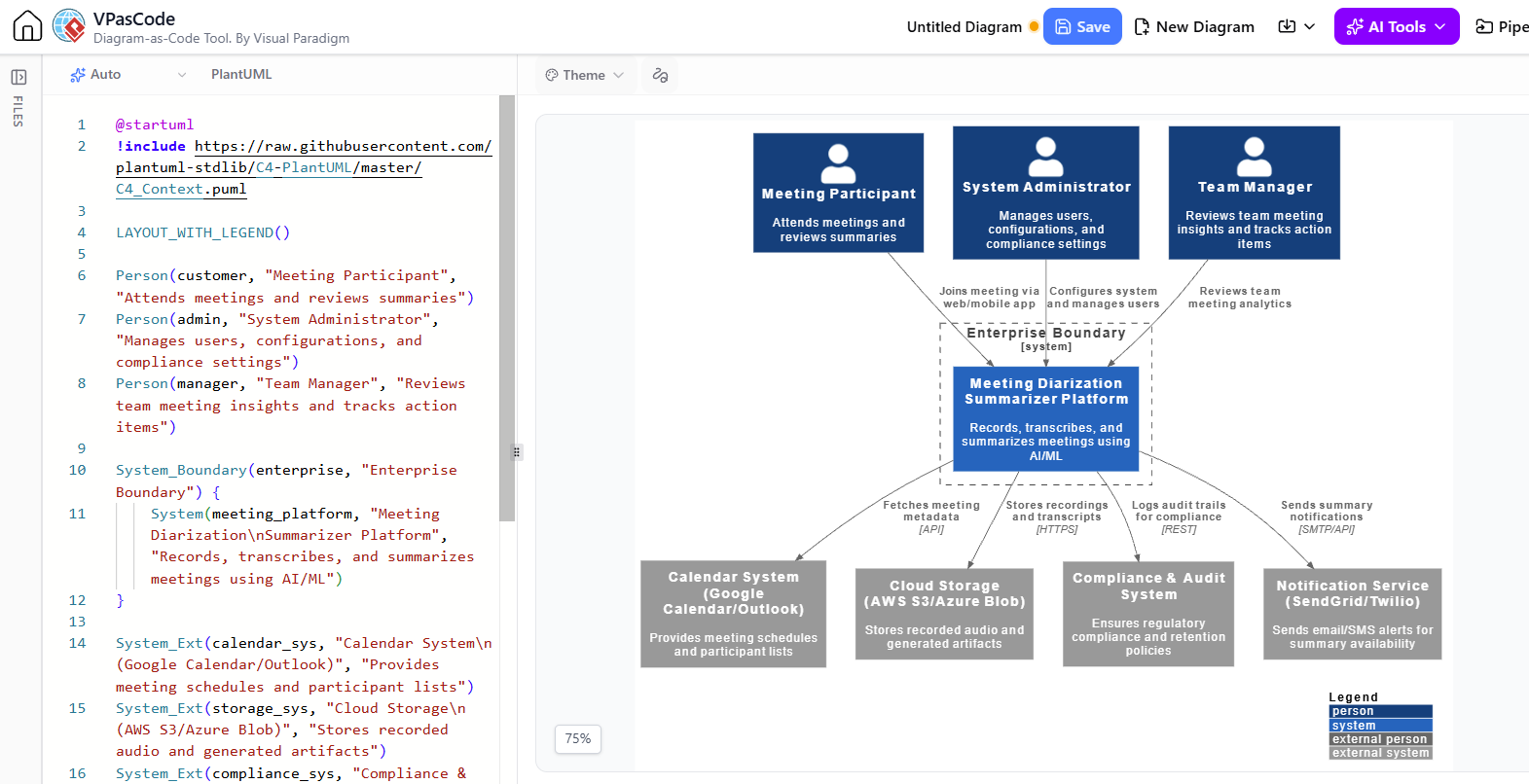
@startuml
!include https://raw.githubusercontent.com/plantuml-stdlib/C4-PlantUML/master/C4_Context.puml

LAYOUT_WITH_LEGEND()

Person(customer, "Meeting Participant", "Attends meetings and reviews summaries")
Person(admin, "System Administrator", "Manages users, configurations, and compliance settings")
Person(manager, "Team Manager", "Reviews team meeting insights and tracks action items")

System_Boundary(enterprise, "Enterprise Boundary") {
    System(meeting_platform, "Meeting Diarization\nSummarizer Platform", "Records, transcribes, and summarizes meetings using AI/ML")
}

System_Ext(calendar_sys, "Calendar System\n(Google Calendar/Outlook)", "Provides meeting schedules and participant lists")
System_Ext(storage_sys, "Cloud Storage\n(AWS S3/Azure Blob)", "Stores recorded audio and generated artifacts")
System_Ext(compliance_sys, "Compliance & Audit System", "Ensures regulatory compliance and retention policies")
System_Ext(notification_sys, "Notification Service\n(SendGrid/Twilio)", "Sends email/SMS alerts for summary availability")

Rel(customer, meeting_platform, "Joins meeting via\nweb/mobile app")
Rel(admin, meeting_platform, "Configures system\nand manages users")
Rel(manager, meeting_platform, "Reviews team\nmeeting analytics")

Rel(meeting_platform, calendar_sys, "Fetches meeting\nmetadata", "API")
Rel(meeting_platform, storage_sys, "Stores recordings\nand transcripts", "HTTPS")
Rel(meeting_platform, compliance_sys, "Logs audit trails\nfor compliance", "REST")
Rel(meeting_platform, notification_sys, "Sends summary\nnotifications", "SMTP/API")

@enduml
Diagram Explanation
This Context Diagram reveals:
Internal System:
-
Meeting Diarization Summarizer Platform: The core AI-powered application
Primary Actors:
-
Meeting Participant: End-user who attends meetings and consumes summaries
-
System Administrator: Technical operator managing infrastructure and security
-
Team Manager: Business user leveraging insights for decision-making
External Dependencies:
-
Calendar System: Provides scheduling context and participant information
-
Cloud Storage: Persistent storage for audio files and generated content
-
Compliance System: Ensures legal/regulatory adherence (critical for enterprise)
-
Notification Service: Delivers asynchronous updates to users
Key Relationships:
-
Participants interact directly with the platform during meetings
-
The platform pulls metadata from calendars to enrich transcription context
-
All recordings flow to secure cloud storage with encryption
-
Audit logs satisfy compliance requirements for regulated industries
-
Notifications keep users informed without requiring constant polling
The Four Levels of C4 Diagrams
While this case study focuses on Context Diagrams, understanding the complete C4 hierarchy is essential:
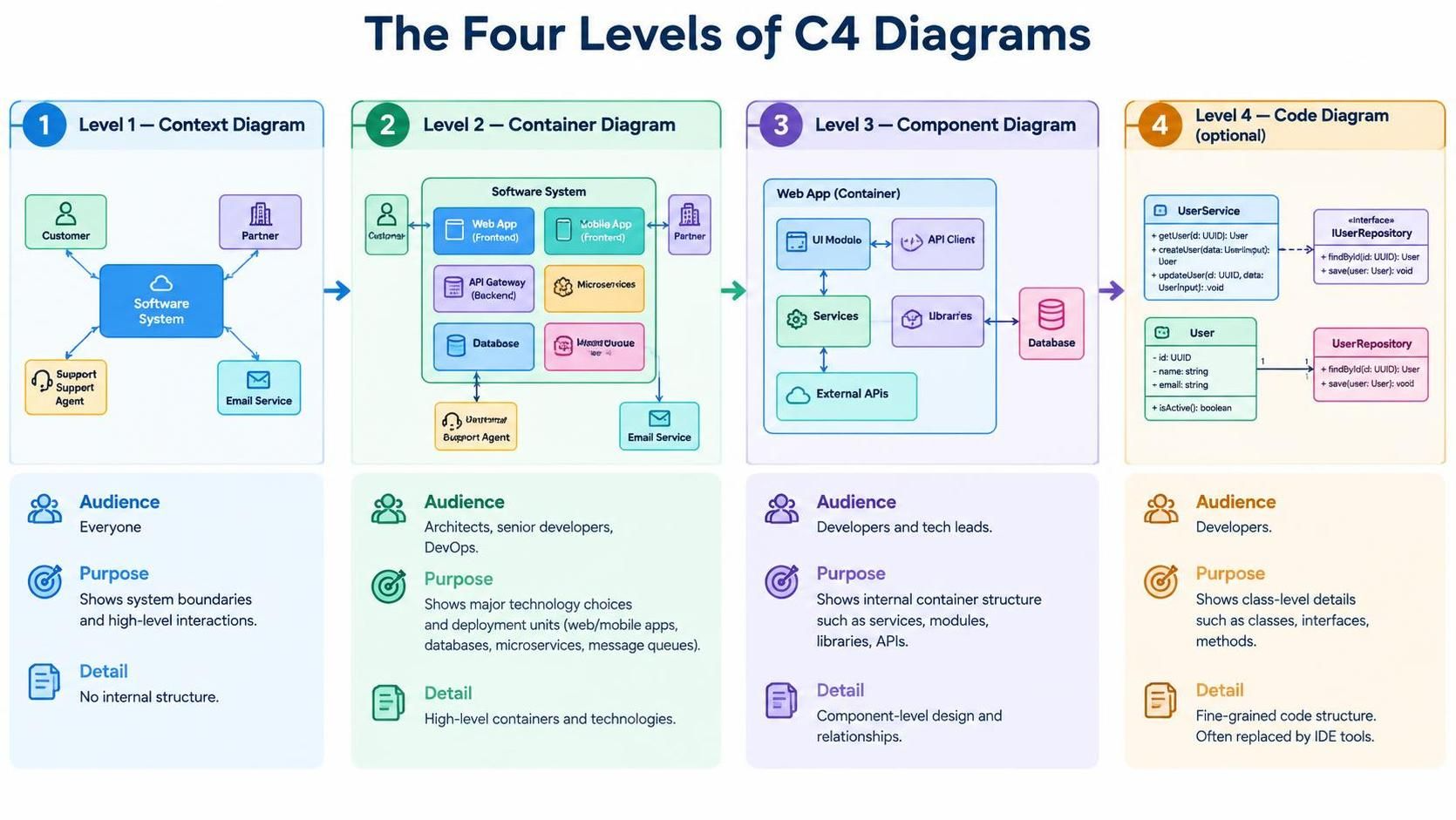
Level 1: Context Diagram (System Context)
-
Audience: Everyone (technical and non-technical)
-
Purpose: Show system boundaries and high-level interactions
-
Detail: No internal structure visible
Level 2: Container Diagram
-
Audience: Architects, senior developers, DevOps
-
Purpose: Show major technology choices and deployment units
-
Detail: Web apps, mobile apps, databases, microservices, message queues
Level 3: Component Diagram
-
Audience: Developers, tech leads
-
Purpose: Show internal structure of containers
-
Detail: Services, modules, libraries, APIs
Level 4: Code Diagram (Optional)
-
Audience: Developers
-
Purpose: Show class-level details
-
Detail: Classes, interfaces, methods (often replaced by IDE tools)
Usage Cases: When to Use C4 Context Diagrams
1. Project Kickoff & Stakeholder Alignment
Scenario: Starting a new AI product initiative
Benefit: Ensures business sponsors, product managers, and engineers share the same mental model of system scope and integrations before writing code.
2. Legacy System Modernization
Scenario: Migrating monolithic applications to microservices
Benefit: Documents existing external dependencies to prevent breaking integrations during refactoring.
3. Compliance & Security Reviews
Scenario: Preparing for SOC 2 or HIPAA audits
Benefit: Clearly shows data flows, external systems, and trust boundaries for security assessors.
4. Onboarding New Team Members
Scenario: Hiring developers for an established platform
Benefit: Provides immediate context without requiring weeks of codebase exploration.
5. Vendor Evaluation & Integration Planning
Scenario: Choosing between competing third-party services
Benefit: Visualizes integration points to assess complexity and risk of each option.
6. Incident Response & Root Cause Analysis
Scenario: Debugging production failures involving multiple systems
Benefit: Quickly identifies which external dependencies may be affected or causing issues.
Tooling: Visual Paradigm C4 Model + VPasCode + AI Assistance
Why Visual Paradigm?
Visual Paradigm offers comprehensive C4 modeling support with unique advantages:
1. Native C4 Model Support
-
Built-in C4 stencils for Context, Container, Component, and Code diagrams
-
Automatic enforcement of C4 notation standards
-
Consistent visual language across all diagram levels
2. VPasCode: Diagram-as-Code Capability
VPasCode bridges the gap between visual modeling and version-controlled code:
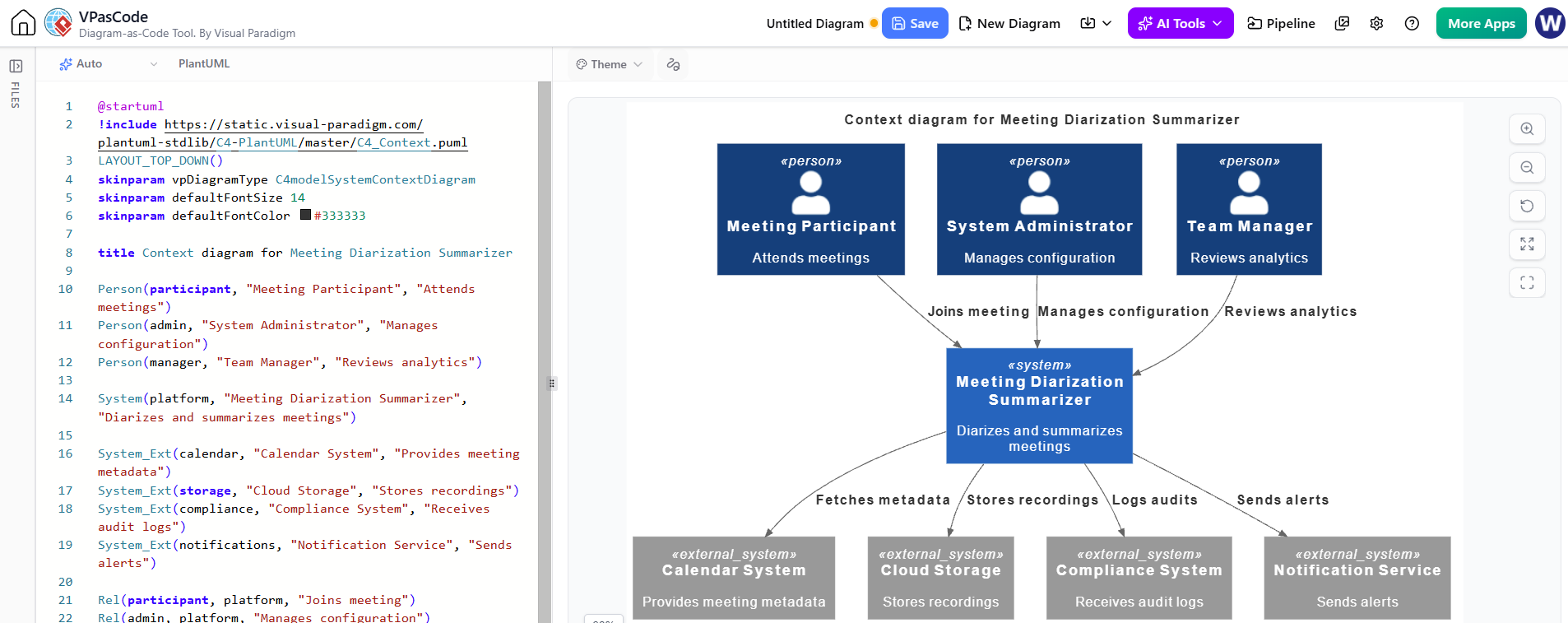
@startuml
!include https://static.visual-paradigm.com/plantuml-stdlib/C4-PlantUML/master/C4_Context.puml
LAYOUT_TOP_DOWN()
skinparam vpDiagramType C4modelSystemContextDiagram
skinparam defaultFontSize 14
skinparam defaultFontColor #333333

title Context diagram for Meeting Diarization Summarizer

Person(participant, "Meeting Participant", "Attends meetings")
Person(admin, "System Administrator", "Manages configuration")
Person(manager, "Team Manager", "Reviews analytics")

System(platform, "Meeting Diarization Summarizer", "Diarizes and summarizes meetings")

System_Ext(calendar, "Calendar System", "Provides meeting metadata")
System_Ext(storage, "Cloud Storage", "Stores recordings")
System_Ext(compliance, "Compliance System", "Receives audit logs")
System_Ext(notifications, "Notification Service", "Sends alerts")

Rel(participant, platform, "Joins meeting")
Rel(admin, platform, "Manages configuration")
Rel(manager, platform, "Reviews analytics")

Rel(platform, calendar, "Fetches metadata")
Rel(platform, storage, "Stores recordings")
Rel(platform, compliance, "Logs audits")
Rel(platform, notifications, "Sends alerts")
@endumlBenefits of VPasCode:
-
Version Control: Diagrams live in Git alongside source code
-
Code Review: Changes reviewed through pull requests
-
Automation: CI/CD pipelines can validate diagram consistency
-
Collaboration: Multiple contributors can edit without merge conflicts
3. AI-Assisted Features
Visual Paradigm’s AI capabilities enhance C4 modeling:
a) Natural Language to Diagram
User prompt: "Create a C4 Context Diagram for an e-commerce platform
with customers, admins, payment gateway, inventory system, and shipping provider"

AI output: Generates initial C4 Context Diagram with proper elements
and relationships, ready for refinement
b) Intelligent Suggestions
-
Recommends missing external systems based on system description
-
Suggests appropriate relationship labels based on interaction patterns
-
Identifies potential security concerns in data flows
c) Diagram Validation
-
Checks for orphaned elements (no connections)
-
Validates naming conventions
-
Ensures consistency across diagram levels
d) Documentation Generation
-
Automatically generates narrative descriptions from diagrams
-
Creates stakeholder-specific views (executive summary vs. technical deep-dive)
-
Exports to Confluence, Word, or PDF with embedded diagrams
Diagram Examples Using C4-PlantUML
Example 1: Simple SaaS Application Context
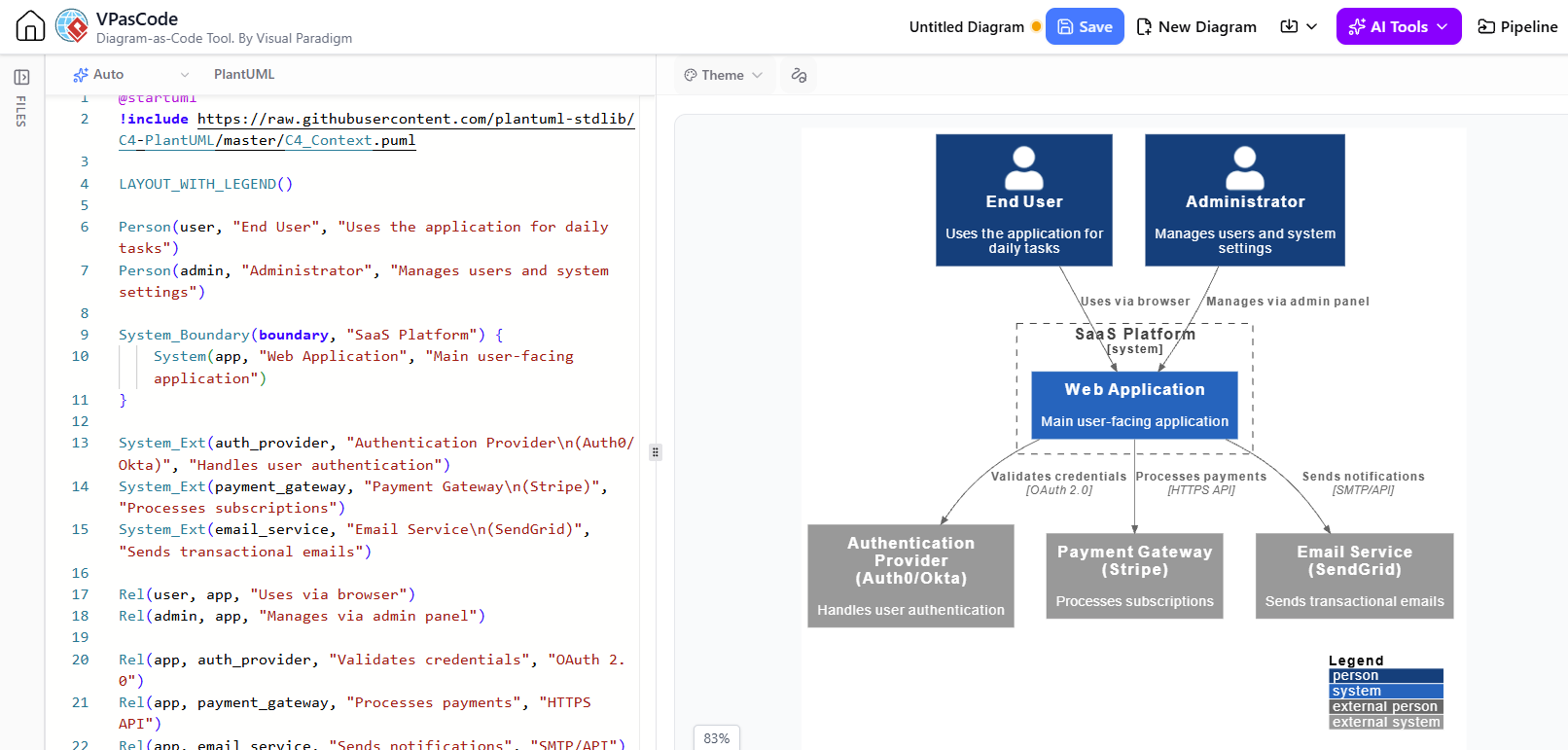
@startuml
!include https://raw.githubusercontent.com/plantuml-stdlib/C4-PlantUML/master/C4_Context.puml

LAYOUT_WITH_LEGEND()

Person(user, "End User", "Uses the application for daily tasks")
Person(admin, "Administrator", "Manages users and system settings")

System_Boundary(boundary, "SaaS Platform") {
    System(app, "Web Application", "Main user-facing application")
}

System_Ext(auth_provider, "Authentication Provider\n(Auth0/Okta)", "Handles user authentication")
System_Ext(payment_gateway, "Payment Gateway\n(Stripe)", "Processes subscriptions")
System_Ext(email_service, "Email Service\n(SendGrid)", "Sends transactional emails")

Rel(user, app, "Uses via browser")
Rel(admin, app, "Manages via admin panel")

Rel(app, auth_provider, "Validates credentials", "OAuth 2.0")
Rel(app, payment_gateway, "Processes payments", "HTTPS API")
Rel(app, email_service, "Sends notifications", "SMTP/API")

@enduml
Example 2: Microservices Ecosystem Context
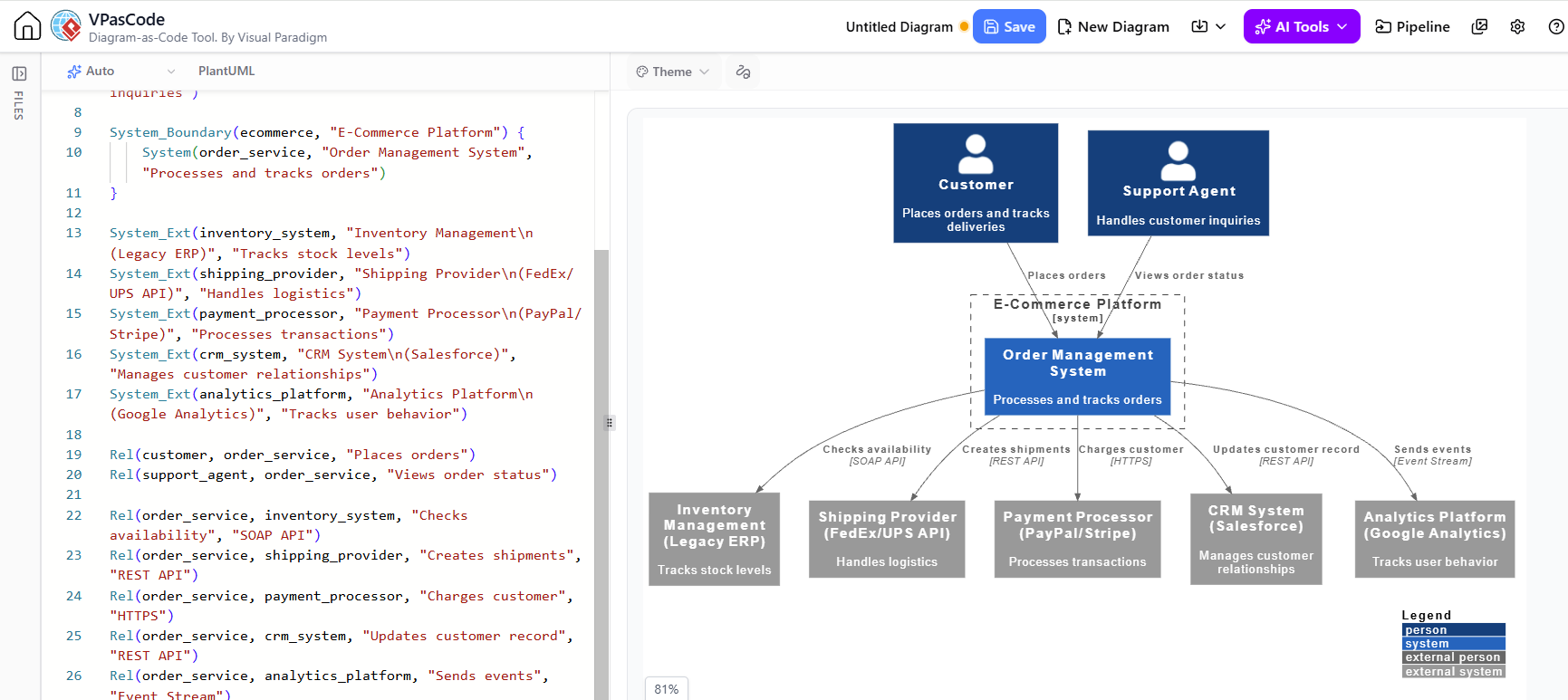
@startuml
!include https://raw.githubusercontent.com/plantuml-stdlib/C4-PlantUML/master/C4_Context.puml

LAYOUT_WITH_LEGEND()

Person(customer, "Customer", "Places orders and tracks deliveries")
Person(support_agent, "Support Agent", "Handles customer inquiries")

System_Boundary(ecommerce, "E-Commerce Platform") {
    System(order_service, "Order Management System", "Processes and tracks orders")
}

System_Ext(inventory_system, "Inventory Management\n(Legacy ERP)", "Tracks stock levels")
System_Ext(shipping_provider, "Shipping Provider\n(FedEx/UPS API)", "Handles logistics")
System_Ext(payment_processor, "Payment Processor\n(PayPal/Stripe)", "Processes transactions")
System_Ext(crm_system, "CRM System\n(Salesforce)", "Manages customer relationships")
System_Ext(analytics_platform, "Analytics Platform\n(Google Analytics)", "Tracks user behavior")

Rel(customer, order_service, "Places orders")
Rel(support_agent, order_service, "Views order status")

Rel(order_service, inventory_system, "Checks availability", "SOAP API")
Rel(order_service, shipping_provider, "Creates shipments", "REST API")
Rel(order_service, payment_processor, "Charges customer", "HTTPS")
Rel(order_service, crm_system, "Updates customer record", "REST API")
Rel(order_service, analytics_platform, "Sends events", "Event Stream")

@enduml
Example 3: IoT System Context
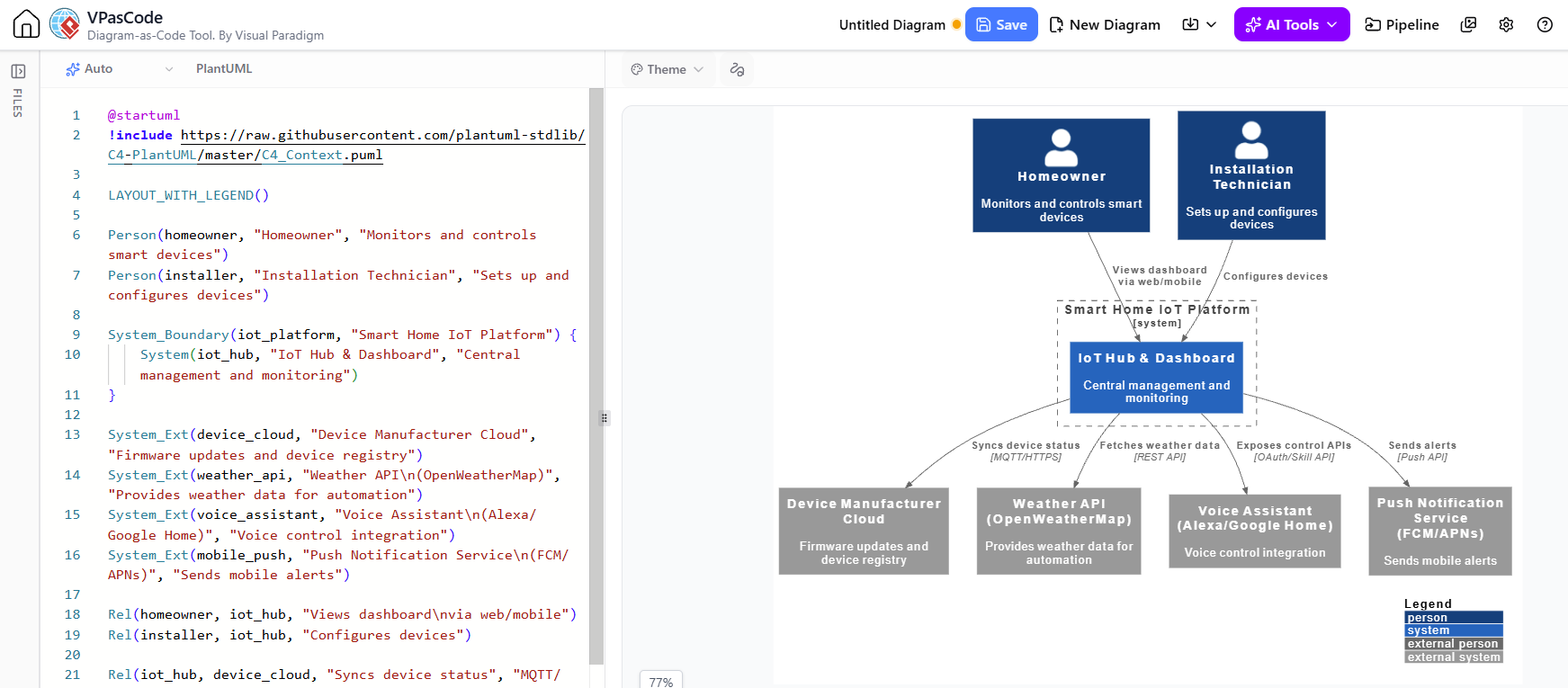
@startuml
!include https://raw.githubusercontent.com/plantuml-stdlib/C4-PlantUML/master/C4_Context.puml

LAYOUT_WITH_LEGEND()

Person(homeowner, "Homeowner", "Monitors and controls smart devices")
Person(installer, "Installation Technician", "Sets up and configures devices")

System_Boundary(iot_platform, "Smart Home IoT Platform") {
    System(iot_hub, "IoT Hub & Dashboard", "Central management and monitoring")
}

System_Ext(device_cloud, "Device Manufacturer Cloud", "Firmware updates and device registry")
System_Ext(weather_api, "Weather API\n(OpenWeatherMap)", "Provides weather data for automation")
System_Ext(voice_assistant, "Voice Assistant\n(Alexa/Google Home)", "Voice control integration")
System_Ext(mobile_push, "Push Notification Service\n(FCM/APNs)", "Sends mobile alerts")

Rel(homeowner, iot_hub, "Views dashboard\nvia web/mobile")
Rel(installer, iot_hub, "Configures devices")

Rel(iot_hub, device_cloud, "Syncs device status", "MQTT/HTTPS")
Rel(iot_hub, weather_api, "Fetches weather data", "REST API")
Rel(iot_hub, voice_assistant, "Exposes control APIs", "OAuth/Skill API")
Rel(iot_hub, mobile_push, "Sends alerts", "Push API")

@enduml
Who Benefits from C4 Context Diagrams?
1. Product Managers (Like Eddie Man)
Benefits:
-
Communicates system scope to stakeholders without technical jargon
-
Identifies integration dependencies early in roadmap planning
-
Facilitates conversations with engineering about feasibility and effort
-
Supports user story mapping by clarifying actor-system interactions
Real Application:
Eddie can use Context Diagrams when collaborating with old contacts on new projects, quickly aligning everyone on system boundaries before discussing implementation details. His experience with AI product lines and end-to-end testing makes him particularly adept at identifying critical external dependencies (like ML model serving platforms or data labeling services).
2. Software Architects
Benefits:
-
Establishes clear system boundaries before detailed design
-
Documents architectural decisions and rationales
-
Enables consistent communication across distributed teams
-
Supports architecture review boards with standardized notation
3. Development Teams
Benefits:
-
Reduces onboarding time for new developers
-
Clarifies which external APIs require mocking in tests
-
Identifies integration points needing error handling and retry logic
-
Supports test-driven development by defining system contracts
4. DevOps & SRE Engineers
Benefits:
-
Maps deployment dependencies and failure domains
-
Identifies external services requiring monitoring and alerting
-
Clarifies network topology and security zones
-
Supports incident response by showing system relationships
5. Business Stakeholders & Executives
Benefits:
-
Understands technology investments without drowning in details
-
Sees vendor lock-in risks through external system dependencies
-
Evaluates compliance implications of data flows
-
Makes informed decisions about build-vs-buy strategies
6. Security & Compliance Officers
Benefits:
-
Visualizes data flows for privacy impact assessments
-
Identifies trust boundaries requiring encryption or authentication
-
Documents third-party vendor relationships for audits
-
Supports threat modeling exercises
Standout Features: Why C4 Context Diagrams Excel
1. Progressive Disclosure
Unlike UML or ArchiMate diagrams that often overwhelm with detail, C4 starts simple and allows drilling down only when needed. This respects cognitive load and audience expertise.
2. Technology-Agnostic Yet Practical
Context Diagrams don’t prescribe technologies but naturally lead to Container Diagrams where technology choices become relevant. This separation keeps early discussions focused on what rather than how.
3. Living Documentation
With VPasCode and Git integration, diagrams evolve with the codebase. No more stale Visio files from three years ago that nobody trusts.
4. Universal Language
The simple notation (boxes, people, arrows) is understood by executives, product managers, developers, and customers alike. No specialized training required.
5. AI-Enhanced Creation
Modern tools like Visual Paradigm with AI assistance reduce the friction of diagram creation. Describe your system in natural language, get a draft diagram, then refine collaboratively.
6. Integration with Agile Practices
Context Diagrams complement user stories, acceptance criteria, and sprint planning by providing system-level context for individual features.
Tips and Tricks for Effective C4 Context Diagrams
Tip 1: Start with the System Name and Purpose
Before drawing boxes, write a one-sentence description: “The Meeting Diarization Summarizer automatically records, transcribes, and summarizes corporate meetings using AI.” This clarity guides all subsequent decisions.
Tip 2: Limit External Systems to True Dependencies
Don’t include every possible integration. Ask: “If this external system went down, would our system fail or degrade significantly?” If yes, include it. If no, omit it or document it elsewhere.
Tip 3: Use Meaningful Relationship Labels
Bad: "connects to"
Good: "authenticates users via OAuth 2.0"
Better: "validates JWT tokens for session management"
Specific labels reveal architectural intent and security considerations.
Tip 4: Distinguish Between People Roles, Not Individuals
Use "Customer" not "John Smith". Use "System Administrator" not "DevOps Team". Roles remain stable; individuals change.
Tip 5: Show Direction of Data Flow
Arrows should indicate the primary direction of interaction. Bidirectional relationships are rare at the Context level—if both systems actively initiate calls, consider two separate arrows with different labels.
Tip 6: Keep It on One Page
A Context Diagram should fit on a single screen or printed page. If you’re adding a seventh external system, question whether some belong in a separate bounded context or subsystem.
Tip 7: Version Your Diagrams
With VPasCode, commit diagrams to Git with meaningful messages:
git add context-diagram.vpcode
git commit -m "Add compliance system integration for SOC 2 requirements"
Tip 8: Review with Non-Technical Stakeholders First
If a product manager or business analyst can’t understand your Context Diagram, it’s too technical. Simplify until the core message is clear to all audiences.
Tip 9: Link to Lower-Level Diagrams
In Visual Paradigm, hyperlink from the Context Diagram to corresponding Container Diagrams. This creates navigable documentation that supports both high-level understanding and deep dives.
Tip 10: Automate Validation
Set up CI/CD checks that:
-
Verify all elements have descriptions
-
Ensure no orphaned elements exist
-
Check naming consistency across diagram levels
-
Validate that external systems match actual production dependencies
Common Pitfalls to Avoid
❌ Pitfall 1: Including Internal Components
Wrong: Showing databases, APIs, or microservices in a Context Diagram
Right: Save those details for Container and Component Diagrams
❌ Pitfall 2: Vague Relationship Labels
Wrong: "uses" or "integrates with"
Right: "submits payment authorization requests" or "receives webhook notifications"
❌ Pitfall 3: Overcomplicating with Too Many Actors
Wrong: Listing every user persona (Admin, Super Admin, Content Admin, etc.)
Right: Group into logical roles (Administrator, End User, Auditor)
❌ Pitfall 4: Ignoring Security Boundaries
Wrong: Not distinguishing between trusted internal systems and untrusted external services
Right: Use System_Boundary to clearly show what’s inside your control
❌ Pitfall 5: Treating Diagrams as One-Time Artifacts
Wrong: Creating diagrams during initial design and never updating them
Right: Treat diagrams as living documentation, updated with each significant architectural change
Advanced Techniques
Technique 1: Multiple Context Views
For complex systems, create multiple Context Diagrams from different perspectives:
-
Business View: Focus on value streams and customer journeys
-
Technical View: Emphasize integration protocols and data formats
-
Security View: Highlight trust boundaries and authentication flows
Technique 2: Decision Records
Attach Architecture Decision Records (ADRs) to Context Diagram elements:
## ADR-042: Choice of Payment Gateway

**Context**: Context Diagram shows dependency on external payment processor

**Decision**: Selected Stripe over PayPal due to superior API documentation
and better support for subscription billing

**Consequences**:
- Requires PCI compliance validation
- Locks us into Stripe's pricing model
- Enables faster checkout experience
Technique 3: Threat Modeling Integration
Use Context Diagrams as input for STRIDE threat modeling:
-
Spoofing: Can attackers impersonate external systems?
-
Tampering: Is data integrity protected in transit?
-
Repudiation: Are audit logs sufficient for non-repudiation?
-
Information Disclosure: Does the diagram reveal sensitive data flows?
-
Denial of Service: What happens if external systems are unavailable?
-
Elevation of Privilege: Are trust boundaries properly enforced?
Technique 4: Capacity Planning
Annotate Context Diagrams with expected volumes:
-
"10,000 requests/day"on API connections -
"500 GB/month"on storage relationships -
"99.9% uptime SLA"on critical dependencies
This informs infrastructure sizing and redundancy decisions.
Measuring Success: How to Know Your Context Diagram Works
Quantitative Metrics
-
Onboarding Time Reduction: New team members reach productivity 30-50% faster with clear Context Diagrams
-
Stakeholder Alignment: Fewer clarification meetings needed during project kickoff
-
Documentation Freshness: Diagrams updated within 48 hours of architectural changes
-
Incident Resolution: Faster root cause analysis when system relationships are documented
Qualitative Indicators
-
Confidence: Stakeholders reference the diagram in discussions without hesitation
-
Consistency: Different team members describe the system the same way
-
Completeness: New integrations are added to the diagram before implementation begins
-
Clarity: Non-technical audiences can explain the system’s purpose and boundaries
Conclusion
The C4 Context Diagram represents more than just a visualization technique—it embodies a philosophy of clear, hierarchical communication in software architecture. By starting with the simplest possible representation of a system and its environment, teams establish shared understanding before diving into complexity.
Through the case study of the Enterprise Meeting Diarization Summarizer Platform, we’ve seen how Context Diagrams clarify AI/ML system ecosystems, revealing critical dependencies on calendar systems, cloud storage, compliance platforms, and notification services. This clarity enables better decision-making, reduces integration risks, and accelerates stakeholder alignment.
Modern tooling transforms C4 modeling from a manual, error-prone process into a streamlined, collaborative workflow. Visual Paradigm’s native C4 support, combined with VPasCode’s diagram-as-code capabilities and AI-assisted features, addresses historical pain points:
-
Version control ensures diagrams evolve with code
-
AI assistance reduces creation friction and suggests improvements
-
Automated validation maintains consistency and completeness
-
Seamless navigation links Context Diagrams to deeper architectural levels
For professionals like Eddie Man—who bridges product management, AI development, and enterprise architecture—C4 Context Diagrams offer a powerful communication tool. Whether collaborating with old contacts on new ventures, documenting personal GitHub projects, or leading enterprise initiatives, the ability to quickly convey system scope and dependencies is invaluable.
The benefits extend across roles:
-
Product Managers gain clarity on integration effort and feasibility
-
Architects establish boundaries before detailed design
-
Developers understand external dependencies for testing and error handling
-
Executives see technology investments without technical overwhelm
-
Security teams identify trust boundaries and data flows
As software systems grow increasingly complex—with AI/ML components, cloud-native architectures, and extensive third-party integrations—the need for clear architectural communication becomes paramount. C4 Context Diagrams, supported by modern tooling, provide that clarity without sacrificing rigor.
The key takeaway: Start simple, stay consistent, and keep diagrams alive. A Context Diagram is not a one-time deliverable but a living artifact that evolves with your system. Invest in tooling that supports this evolution, train your team in C4 principles, and watch as architectural misunderstandings decrease, onboarding accelerates, and stakeholder confidence grows.
In an era where AI-assisted development and rapid iteration are the norm, the ability to quickly create, update, and communicate architectural context is not just nice-to-have—it’s a competitive advantage. The C4 Context Diagram, enhanced by tools like Visual Paradigm and VPasCode, delivers exactly that advantage.

